Level Beginner Reading 6 min Data October 2026 Programs ArcGIS 



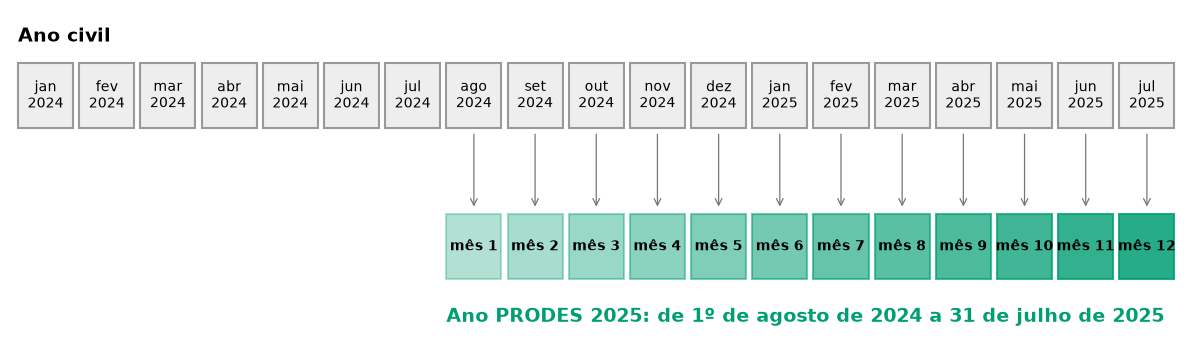
Every monitoring dashboard needs to break dates into parts: year, month, month name and, for deforestation, the PRODES year, which runs from August 1 to July 31. “PRODES 2025” starts in August 2024.
In the old scripts, each part was a function with an UpdateCursor, repeated across several files. Here each one becomes a single line in each program.
The rules
The field names are in Portuguese, as in the dashboards: ano = year, mes = month, mes_nome = month name, ano_prodes = PRODES year, mes_prodes = PRODES month.
| Field | Rule | 2025-03-15 | 2025-09-20 |
|---|---|---|---|
ano |
year of the date | 2025 | 2025 |
mes |
month of the date | 3 | 9 |
mes_nome |
month name, from a fixed list | March | September |
ano_prodes |
year + 1 if the month is August or later | 2025 | 2026 |
mes_prodes |
August = 1 … July = 12, or (mes + 4) % 12 + 1 |
8 | 2 |
% is the remainder of the division: (9 + 4) % 12 + 1 = 13 % 12 + 1 = 1 + 1 = 2.
The old script used strftime("%B"), which returns the month name in the system language: “março” on a computer in Portuguese, “March” on a server in English. In a dashboard, that mixes languages. Use a fixed list of names, as in the code below.
The code
The examples use the deter layer (field view_date) of the articles’ GeoPackage (how to download).
import arcpy

fc = r"C:\dados\resultados.gdb\deter"
arcpy.management.CopyFeatures(r"C:\dados\artigos.gpkg\main.deter", fc)

meses = ("['January','February','March','April','May','June','July',"
         "'August','September','October','November','December']")

arcpy.management.CalculateFields(fc, "PYTHON3", [
    ["ano",        "!view_date!.year"],
    ["mes",        "!view_date!.month"],
    ["mes_nome",   f"{meses}[!view_date!.month - 1]"],
    ["ano_prodes", "!view_date!.year + (1 if !view_date!.month >= 8 else 0)"],
    ["mes_prodes", "(!view_date!.month + 4) % 12 + 1"],
])
CalculateFields (plural) computes several fields at once and creates the ones that do not exist. In ArcMap, use one CalculateField_management per field, with "PYTHON_9.3".
In the Field Calculator, create each field with the expression:
| Field | Type | Expression |
|---|---|---|
ano |
integer | year("view_date") |
mes |
integer | month("view_date") |
mes_nome |
text | array_get(array('January','February','March','April','May','June','July','August','September','October','November','December'), month("view_date") - 1) |
ano_prodes |
integer | year("view_date") + if(month("view_date") >= 8, 1, 0) |
mes_prodes |
integer | (month("view_date") + 4) % 12 + 1 |
In the Python console, the same five fields in sequence:
import processing
G = "C:/dados/artigos.gpkg"

campos = [
    ("ano", 1, 'year("view_date")'),
    ("mes", 1, 'month("view_date")'),
    ("mes_nome", 2, "array_get(array('January','February','March','April','May','June',"
                    "'July','August','September','October','November','December'), "
                    'month("view_date") - 1)'),
    ("ano_prodes", 1, 'year("view_date") + if(month("view_date") >= 8, 1, 0)'),
    ("mes_prodes", 1, '(month("view_date") + 4) % 12 + 1'),
]
camada = f"{G}|layername=deter"
for nome, tipo, formula in campos:          # type: 1 = integer, 2 = text
    camada = processing.run("native:fieldcalculator", {
        "INPUT": camada, "FIELD_NAME": nome, "FIELD_TYPE": tipo, "FIELD_LENGTH": 12,
        "FORMULA": formula, "OUTPUT": "memory:"})["OUTPUT"]

resumo = processing.run("qgis:statisticsbycategories", {
    "INPUT": camada, "CATEGORIES_FIELD_NAME": ["ano_prodes"], "OUTPUT": "memory:"})["OUTPUT"]
for f in resumo.getFeatures():
    print(f["ano_prodes"], f["count"])
SELECT view_date,
extract(year FROM view_date)::int AS ano,
extract(month FROM view_date)::int AS mes,
(ARRAY['January','February','March','April','May','June','July',
'August','September','October','November','December'])
[extract(month FROM view_date)::int] AS mes_nome,
extract(year FROM view_date + interval '5 months')::int AS ano_prodes,
(extract(month FROM view_date)::int + 4) % 12 + 1 AS mes_prodes
FROM artigos.deter
LIMIT 5;
-- Check: alerts by PRODES year
SELECT extract(year FROM view_date + interval '5 months')::int AS ano_prodes, count(*)
FROM artigos.deter
GROUP BY 1
ORDER BY 1;The + interval '5 months' trick: adding 5 months to any date from August to December pushes it into the next year, while dates from January to July stay in the same year. That is exactly the PRODES year rule.
import geopandas as gpd

deter = gpd.read_file("dados/artigos.gpkg", layer="deter")
data = deter["view_date"].astype("datetime64[ns]")

MESES = ["January", "February", "March", "April", "May", "June", "July",
         "August", "September", "October", "November", "December"]

deter["ano"] = data.dt.year
deter["mes"] = data.dt.month
deter["mes_nome"] = deter["mes"].map(lambda m: MESES[m - 1])
deter["ano_prodes"] = deter["ano"] + (deter["mes"] >= 8).astype(int)
deter["mes_prodes"] = (deter["mes"] + 4) % 12 + 1

print(deter[["view_date", "ano", "mes", "mes_nome", "ano_prodes", "mes_prodes"]].head())
print(deter.groupby("ano_prodes").size())
In Power Query (Home → Transform data), use Add Column → Custom Column:
// ano_prodes
Date.Year([view_date]) + (if Date.Month([view_date]) >= 8 then 1 else 0)

// mes_prodes
Number.Mod(Date.Month([view_date]) + 4, 12) + 1

// mes_nome (fixed list, independent of the language)
{"January","February","March","April","May","June","July",
 "August","September","October","November","December"}{Date.Month([view_date]) - 1}
Or in DAX, as a calculated column of the calendar table:
PRODES year = YEAR ( dim_calendario[data] ) + IF ( MONTH ( dim_calendario[data] ) >= 8, 1, 0 )
PRODES month = MOD ( MONTH ( dim_calendario[data] ) + 4, 12 ) + 1
To sort months in PRODES-year order in charts, select the mes_nome column and use Sort by column → mes_prodes.
Checking the result
The QGIS, PostGIS and Python versions gave the same count of alerts by PRODES year:
| PRODES year | Period | DETER alerts in the study area |
|---|---|---|
| 2024 | Jan to Jul 2024 (the download starts in 2024) | 639 |
| 2025 | Aug 2024 to Jul 2025 | 5,787 |
| 2026 | Aug 2025 to Jul 2026 | 595 |
| 2027 | Aug to Oct 2026 (ongoing) | 802 |
The 2025 peak is 5,127 burn scars from the 2024 drought. Separating by class, clear-cut deforestation alerts (DESMATAMENTO_CR) numbered 431 in 2025 and 300 in 2026. That is why dashboards almost always separate deforestation from fire.
First and last day of the period
Two other common questions: “what are the first and last alerts in the layer?” (for the report title) and “what is the last day of the month?” (to know whether the month is closed).
| First and last date | Last day of the month | |
|---|---|---|
| ArcGIS Pro | min()/max() over arcpy.da.SearchCursor(fc, ["view_date"]) |
calendar.monthrange(year, month)[1] |
| QGIS | minimum("view_date"), maximum("view_date") |
make_date(year(d), month(d), 1) + '1 month' - '1 day' |
| PostGIS | min(view_date), max(view_date) |
(date_trunc('month', d) + interval '1 month - 1 day')::date |
| Python | deter["view_date"].min() |
date + pd.offsets.MonthEnd(0) |
| Power BI (DAX) | MIN(), MAX() |
EOMONTH ( date, 0 ) |
See also
- Monthly cumulative table, which uses these fields
- Course module 7: Power BI (in Portuguese), with the calendar table
Updates
- 2026-10-29: first published, with data from INPE, MMA, IBAMA and SICAR from October 2026.
Reuse
Citation
@misc{alves2026,
  author = {Alves, Hendesson},
  publisher = {Hendesson Alves},
  title = {Year, Month and {PRODES} Year: Date Fields in Every Program},
  date = {2026-10-29},
  url = {https://hendesson.github.io/en/articles/05-date-fields.html},
  doi = {10.5281/zenodo.23780254},
  langid = {en},
  abstract = {Year, month, month name, PRODES year (August to July) and
    PRODES month in one line per program, without depending on the
    computer’s language. Includes Power Query and DAX for those who
    publish in Power BI.}
}