flowchart LR
    A["Filtered<br/>alerts"] --> B["Sum by<br/>area, year, month"]
    G["Grid:<br/>area × year × 12 months"] --> C["Join<br/>(gaps = 0)"]
    B --> C
    C --> D["Cumulative<br/>within the year"]
    D --> E["valid = false<br/>after the last month"]
Level Intermediate Reading 9 min Data October 2026 Programs ArcGIS 



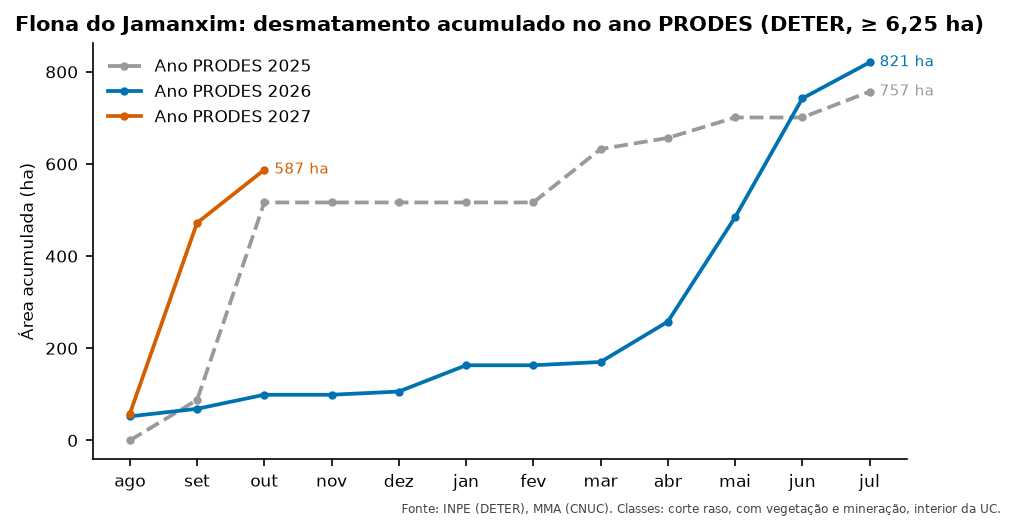
The most requested chart in a deforestation dashboard is the cumulative curve: how much has been cleared since the start of the PRODES year, month by month, compared with previous years.
To draw that curve, the table needs one row per protected area, year and month, including months without any alert (with zero). Without them, the line skips months and the cumulative total is wrong. The script I used did this with pandas itertools.product, merge and cumsum, after several arcpy steps.
What you will do
- Filter deforestation alerts (clear-cut, with vegetation, and mining), inside protected areas, of at least 6.25 ha.
- Compute the PRODES year and PRODES month (see Date fields).
- Build the complete grid: all protected areas × all years × 12 months.
- Sum the area of each month and fill the gaps with zero.
- Accumulate within each protected area and year.
- Flag as not valid the months after the latest data (so the chart does not draw a flat line up to July).
Data
Use the deter_interior_entorno layer created in the article Inside and around protected areas (it already has nome_uc, local and area_ha).
The code
Names in Portuguese: soma = sum, grade = grid, tabela = table, acumulado_ha = cumulative hectares, valido = valid, ultimo = latest, mensal = monthly.
arcpy has no tool to “complete the grid”. The solution is the same as in the original script: sum with arcpy and complete with pandas, which ships with ArcGIS Pro’s Python.
import arcpy
import numpy as np
import pandas as pd

gdb = r"C:\dados\resultados.gdb"
fc = gdb + r"\deter_interior_entorno"
filtro = ("classname IN ('DESMATAMENTO_CR', 'DESMATAMENTO_VEG', 'MINERACAO') "
          "AND local = 'interior' AND area_ha >= 6.25")

# 1 and 2. Read the filtered table into pandas
linhas = arcpy.da.SearchCursor(fc, ["nome_uc", "view_date", "area_ha"], filtro)
d = pd.DataFrame(list(linhas), columns=["nome_uc", "view_date", "area_ha"])
data = pd.to_datetime(d["view_date"])
d["ano_prodes"] = data.dt.year + (data.dt.month >= 8)
d["mes_prodes"] = (data.dt.month + 4) % 12 + 1

# 3 and 4. Complete grid and monthly sum (gaps = 0)
soma = d.groupby(["nome_uc", "ano_prodes", "mes_prodes"])["area_ha"].sum()
grade = pd.MultiIndex.from_product(
    [sorted(d["nome_uc"].unique()), sorted(d["ano_prodes"].unique()), range(1, 13)],
    names=soma.index.names)
tabela = soma.reindex(grade, fill_value=0).reset_index()

# 5. Cumulative
tabela["acumulado_ha"] = tabela.groupby(["nome_uc", "ano_prodes"])["area_ha"].cumsum()

# 6. Months after the latest data
ultimo = max(r[0] for r in arcpy.da.SearchCursor(fc, ["view_date"]))
ano_u, mes_u = ultimo.year + (ultimo.month >= 8), (ultimo.month + 4) % 12 + 1
tabela["valido"] = ~((tabela["ano_prodes"] == ano_u) & (tabela["mes_prodes"] > mes_u))

# Save as a geodatabase table
arr = np.rec.fromrecords(tabela.astype({"nome_uc": "U120", "valido": "int16"}).values,
                         names=list(tabela.columns))
arcpy.da.NumPyArrayToTable(arr, gdb + r"\deter_mensal_acumulado")
In QGIS, the most direct path is a virtual layer: a SQL (SQLite) query over the open layers, with no database. Open Layer → Add Layer → Add/Edit Virtual Layer, import the deter_interior_entorno layer and paste the query. Or, in the console:
consulta = """
WITH alertas AS (
    SELECT nome_uc,
           CAST(strftime('%Y', view_date) AS INTEGER)
             + (CAST(strftime('%m', view_date) AS INTEGER) >= 8)          AS ano_prodes,
           (CAST(strftime('%m', view_date) AS INTEGER) + 4) % 12 + 1      AS mes_prodes,
           area_ha
    FROM deter
    WHERE classname IN ('DESMATAMENTO_CR', 'DESMATAMENTO_VEG', 'MINERACAO')
      AND local = 'interior' AND area_ha >= 6.25
),
meses(mes_prodes) AS (SELECT 1 UNION ALL SELECT mes_prodes + 1 FROM meses WHERE mes_prodes < 12),
grade AS (
    SELECT u.nome_uc, a.ano_prodes, m.mes_prodes
    FROM (SELECT DISTINCT nome_uc FROM alertas) u,
         (SELECT DISTINCT ano_prodes FROM alertas) a, meses m
),
mensal AS (
    SELECT g.nome_uc, g.ano_prodes, g.mes_prodes, coalesce(sum(a.area_ha), 0) AS area_ha
    FROM grade g
    LEFT JOIN alertas a USING (nome_uc, ano_prodes, mes_prodes)
    GROUP BY g.nome_uc, g.ano_prodes, g.mes_prodes
),
ultimo AS (
    SELECT CAST(strftime('%Y', max(view_date)) AS INTEGER)
             + (CAST(strftime('%m', max(view_date)) AS INTEGER) >= 8)      AS ano,
           (CAST(strftime('%m', max(view_date)) AS INTEGER) + 4) % 12 + 1 AS mes
    FROM deter
)
SELECT m.*,
       sum(m.area_ha) OVER (PARTITION BY m.nome_uc, m.ano_prodes
                            ORDER BY m.mes_prodes) AS acumulado_ha,
       NOT (m.ano_prodes = u.ano AND m.mes_prodes > u.mes) AS valido
FROM mensal m, ultimo u
ORDER BY m.nome_uc, m.ano_prodes, m.mes_prodes
"""
deter = QgsVectorLayer("C:/dados/deter_interior_entorno.gpkg", "deter", "ogr")
QgsProject.instance().addMapLayer(deter)
tabela = QgsVectorLayer(f"?query={consulta}", "deter_mensal_acumulado", "virtual")
QgsProject.instance().addMapLayer(tabela)
print(tabela.featureCount(), "rows")
The virtual layer is recomputed whenever the source layer changes, and can be exported as CSV or GeoPackage (right-click → Export).
CREATE OR REPLACE VIEW artigos.deter_mensal_acumulado AS
WITH alertas AS (
    SELECT nome_uc,
           extract(year FROM view_date + interval '5 months')::int AS ano_prodes,
           (extract(month FROM view_date)::int + 4) % 12 + 1      AS mes_prodes,
           area_ha
    FROM artigos.deter_interior_entorno
    WHERE classname IN ('DESMATAMENTO_CR', 'DESMATAMENTO_VEG', 'MINERACAO')
      AND local = 'interior' AND area_ha >= 6.25
),
grade AS (
    SELECT u.nome_uc, a.ano_prodes, m.mes_prodes
    FROM (SELECT DISTINCT nome_uc FROM alertas) u
    CROSS JOIN (SELECT DISTINCT ano_prodes FROM alertas) a
    CROSS JOIN generate_series(1, 12) AS m(mes_prodes)
),
mensal AS (
    SELECT g.nome_uc, g.ano_prodes, g.mes_prodes, coalesce(sum(a.area_ha), 0) AS area_ha
    FROM grade g
    LEFT JOIN alertas a USING (nome_uc, ano_prodes, mes_prodes)
    GROUP BY g.nome_uc, g.ano_prodes, g.mes_prodes
),
ultimo AS (
    SELECT extract(year FROM max(view_date) + interval '5 months')::int AS ano,
           (extract(month FROM max(view_date))::int + 4) % 12 + 1      AS mes
    FROM artigos.deter_interior_entorno
)
SELECT m.nome_uc, m.ano_prodes, m.mes_prodes, round(m.area_ha, 2) AS area_ha,
       round(sum(m.area_ha) OVER (PARTITION BY m.nome_uc, m.ano_prodes
                                  ORDER BY m.mes_prodes), 2) AS acumulado_ha,
       NOT (m.ano_prodes = u.ano AND m.mes_prodes > u.mes) AS valido
FROM mensal m, ultimo u;

SELECT * FROM artigos.deter_mensal_acumulado
WHERE nome_uc = 'FLORESTA NACIONAL DO JAMANXIM' AND ano_prodes = 2027
ORDER BY mes_prodes;
import geopandas as gpd
import pandas as pd
todos = gpd.read_file("dados/deter_interior_entorno.gpkg")
d = todos[todos["classname"].isin(["DESMATAMENTO_CR", "DESMATAMENTO_VEG", "MINERACAO"])
& (todos["local"] == "interior") & (todos["area_ha"] >= 6.25)].copy()
# 2. PRODES year and month
data = pd.to_datetime(d["view_date"])
d["ano_prodes"] = data.dt.year + (data.dt.month >= 8)
d["mes_prodes"] = (data.dt.month + 4) % 12 + 1
# 3 and 4. Complete grid and monthly sum (gaps = 0)
soma = d.groupby(["nome_uc", "ano_prodes", "mes_prodes"])["area_ha"].sum()
grade = pd.MultiIndex.from_product(
[sorted(d["nome_uc"].unique()), sorted(d["ano_prodes"].unique()), range(1, 13)],
names=soma.index.names)
tabela = soma.reindex(grade, fill_value=0).reset_index()
# 5. Cumulative over the PRODES year
tabela["acumulado_ha"] = tabela.groupby(["nome_uc", "ano_prodes"])["area_ha"].cumsum()
# 6. Months after the latest data
ultimo = pd.to_datetime(todos["view_date"]).max()
ano_u, mes_u = ultimo.year + (ultimo.month >= 8), (ultimo.month + 4) % 12 + 1
tabela["valido"] = ~((tabela["ano_prodes"] == ano_u) & (tabela["mes_prodes"] > mes_u))
tabela.round(2).to_csv("dados/deter_mensal_acumulado.csv", index=False)
print(tabela.query("nome_uc == 'FLORESTA NACIONAL DO JAMANXIM' and ano_prodes == 2027").round(2))In Power BI, the complete grid and the cumulative total come from the model, with no prebuilt table: all you need is a calendar table (dim_calendario) related to the alerts by date.
Area (ha) = SUM ( fato_deter[area_ha] ) + 0

Cumulative area in the PRODES year (ha) =
CALCULATE ( [Area (ha)], DATESYTD ( dim_calendario[data], "07-31" ) )

Cumulative area (months with data only) =
IF ( MAX ( dim_calendario[data] ) <= MAX ( fato_deter[view_date] ),
[Cumulative area in the PRODES year (ha)] )- The
+ 0makes months without alerts show up as zero. - The
"07-31"tellsDATESYTDthat the year ends on July 31: that is the PRODES year. - The third measure returns blank after the latest alert, the equivalent of the
validocolumn.
Checking the result
The QGIS (virtual layer), PostGIS and Python versions produced the same table: 288 rows with the same values. PRODES year 2027 in Jamanxim National Forest looks like this:
| PRODES month | Month | Area in month (ha) | Cumulative (ha) | valido |
|---|---|---|---|---|
| 1 | August | 57.7 | 57.7 | yes |
| 2 | September | 414.4 | 472.1 | yes |
| 3 | October | 115.3 | 587.4 | yes |
| 4 | November | 0 | 587.4 | no |
| … | … | 0 | 587.4 | no |
| 12 | July | 0 | 587.4 | no |
In three months, the cumulative total already reached 587 ha, against 757 ha for the whole of PRODES year 2025 and 821 ha for 2026. PRODES year 2024 is incomplete in the table because the downloaded data starts in January 2024.
Where the “6.25 ha” comes from
The minimum-area filter comes from the original script and follows the minimum mapping area of PRODES. DETER has smaller alerts, down to 3 ha. Changing this threshold changes the curve, so state it in the dashboard.
Classes as columns
Another script in the folder turned DETER classes into columns (DCR_AREA, MIN_AREA, …) and replaced blanks with zero. It is the same idea in another form: a pivot table.
| Program | How |
|---|---|
| ArcGIS Pro | arcpy.management.PivotTable(tabela, ["nome_uc"], "classname", "area_ha", saida) |
| QGIS | virtual layer with sum(CASE WHEN classname = 'MINERACAO' THEN area_ha ELSE 0 END) AS min_area |
| PostGIS | sum(area_ha) FILTER (WHERE classname = 'MINERACAO') AS min_area |
| Python | d.pivot_table(index="nome_uc", columns="classname", values="area_ha", aggfunc="sum", fill_value=0) |
| Power BI | a matrix with classname in the columns; no need to pivot |
See also
- Date fields
- Course module 7: Power BI (in Portuguese)
Updates
- 2026-10-29: first published, with data from INPE, MMA, IBAMA and SICAR from October 2026.
Reuse
Citation
BibTeX citation:
@misc{alves2026,
  author = {Alves, Hendesson},
  publisher = {Hendesson Alves},
  title = {DETER Monthly Cumulative Table, with Zero-Filled Months},
  date = {2026-10-29},
  url = {https://hendesson.github.io/en/articles/06-monthly-cumulative-table.html},
  doi = {10.5281/zenodo.23780256},
  langid = {en},
  abstract = {The table behind the cumulative-curve chart of a
    deforestation dashboard: one row per protected area, year and month,
    with zero in months without alerts, cumulative over the PRODES year
    and a flag for months that have not happened yet. Also in DAX, with
    DATESYTD.}
}
For attribution, please cite this work as:
Alves, Hendesson. 2026. “DETER Monthly Cumulative Table, with
Zero-Filled Months.” In Geoprocessing Articles for
Environmental Monitoring. Preprint, Hendesson Alves, October 29. https://doi.org/10.5281/zenodo.23780256.