Level Beginner Reading 6 min Data October 2026 Programs ArcGIS 


Two tasks appear in almost every monitoring script:
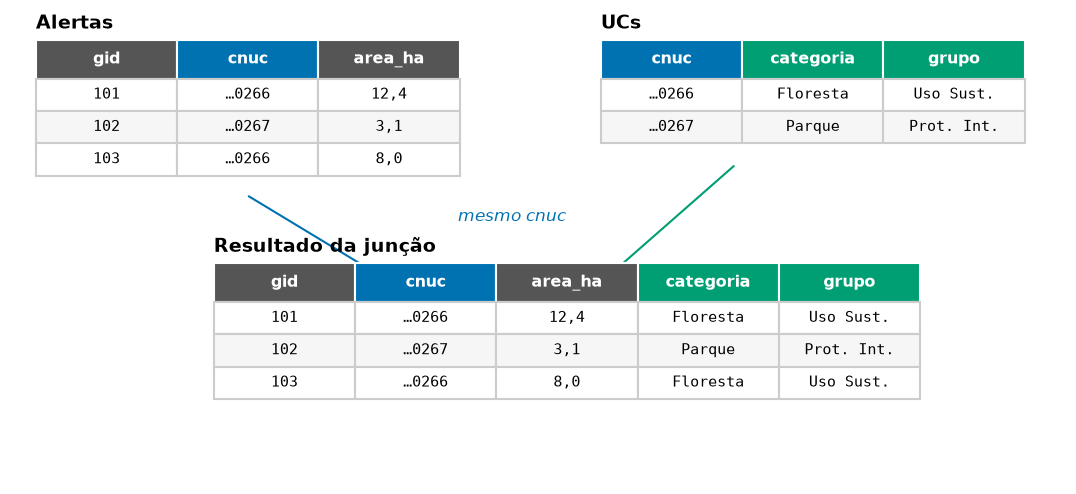
- Join by field: the alerts layer has the protected area code (
cnuc, from Brazil’s National Register of Protected Areas), and you want to bring in the category, group and level of government, which are in the protected areas layer. - List of values: one row per protected area with all the municipalities where alerts occurred, separated by commas. In my script, it was the list of e-mails of the people responsible for each alert.
In the old scripts, the join was done with a dictionary and two cursors, repeated for each field, and the list of values with an 80-line function. In each program, both tasks fit in a few lines.
Data
The deter_interior_entorno layer (from the article Inside and around) and the ucs layer of the articles’ GeoPackage. Municipalities come from DETER’s municipality field.
The code
Names in Portuguese: alertas = alerts, campos = fields, categoria = category, grupo = group, esfera = level of government, municipios = municipalities, lista = list.
import arcpy

gpkg = r"C:\dados\artigos.gpkg"
gdb = r"C:\dados\resultados.gdb"
alertas = gdb + r"\deter_interior_entorno"

# 1. Join by field: one line does it
arcpy.management.JoinField(alertas, "cnuc", gpkg + r"\main.ucs", "cnuc",
                           ["categoria", "grupo", "esfera"])

# 2. List of municipalities by protected area: CONCATENATE statistic (ArcGIS Pro 3.2 or newer)
arcpy.analysis.Statistics(alertas, gdb + r"\municipios_por_uc",
                          [["municipality", "UNIQUE"], ["municipality", "CONCATENATE"]],
                          ["nome_uc"], concatenation_separator=", ")
If JoinField is slow on large tables, the old scripts’ pattern (dictionary + cursor) is faster, but write one dictionary for all fields, not one per field:
campos = ["categoria", "grupo", "esfera"]
ucs = {linha[0]: linha[1:] for linha in
       arcpy.da.SearchCursor(gpkg + r"\main.ucs", ["cnuc"] + campos)}

for c in campos:
    arcpy.management.AddField(alertas, c, "TEXT")
with arcpy.da.UpdateCursor(alertas, ["cnuc"] + campos) as cursor:
    for linha in cursor:
        if linha[0] in ucs:
            cursor.updateRow([linha[0], *ucs[linha[0]]])
In older versions of Pro (without CONCATENATE), build the list with a dictionary of sets:
from collections import defaultdict
lista = defaultdict(set)
for uc, mun in arcpy.da.SearchCursor(alertas, ["nome_uc", "municipality"]):
    if mun:
        lista[uc].add(mun)
municipios = {uc: ", ".join(sorted(m)) for uc, m in lista.items()}
From the menus: alerts layer properties → Joins → +, layer ucs, field cnuc on both sides. To write the join permanently, use Join attributes by field value in the Toolbox. For the list, use Aggregate with the concatenate_unique function.
import processing
G = "C:/dados/artigos.gpkg"

# 1. Join by field
alertas = processing.run("native:joinattributestable", {
    "INPUT": "C:/dados/deter_interior_entorno.gpkg",
    "FIELD": "cnuc", "INPUT_2": f"{G}|layername=ucs", "FIELD_2": "cnuc",
    "FIELDS_TO_COPY": ["categoria", "grupo", "esfera"], "METHOD": 1,   # 1 = first match only
    "OUTPUT": "memory:"})["OUTPUT"]

# 2. One row per protected area, with the list of municipalities and the total area
municipios = processing.run("native:aggregate", {
    "INPUT": alertas, "GROUP_BY": "nome_uc",
    "AGGREGATES": [
        {"aggregate": "first_value", "input": '"nome_uc"', "name": "nome_uc",
         "type": 10, "length": 120, "precision": 0, "delimiter": ""},
        {"aggregate": "first_value", "input": '"categoria"', "name": "categoria",
         "type": 10, "length": 80, "precision": 0, "delimiter": ""},
        {"aggregate": "concatenate_unique", "input": '"municipality"', "name": "municipios",
         "type": 10, "length": 500, "precision": 0, "delimiter": ", "},
        {"aggregate": "sum", "input": '"area_ha"', "name": "area_ha",
         "type": 6, "length": 0, "precision": 2, "delimiter": ""},
    ],
    "OUTPUT": "memory:"})["OUTPUT"]

for f in municipios.getFeatures():
    print(f["nome_uc"], "|", f["categoria"], "|", f["municipios"], "|", round(f["area_ha"]))
In the Field Calculator of the protected areas layer, the same list comes from one expression (protected areas without alerts stay empty): aggregate('deter_interior_entorno', 'concatenate_unique', "municipality", filter:="nome_uc" = attribute(@parent, 'nome_uc'), concatenator:=', ').
-- 1. Join by field
SELECT a.gid, a.nome_uc, a.local, a.area_ha, u.categoria, u.grupo, u.esfera
FROM artigos.deter_interior_entorno a
JOIN artigos.ucs u USING (cnuc)
LIMIT 5;

-- 2. One row per protected area, with the list of municipalities
SELECT a.nome_uc, u.categoria,
       string_agg(DISTINCT a.municipality, ', ' ORDER BY a.municipality) AS municipios,
       round(sum(a.area_ha)) AS area_ha
FROM artigos.deter_interior_entorno a
JOIN artigos.ucs u USING (cnuc)
GROUP BY a.nome_uc, u.categoria
ORDER BY area_ha DESC;
import geopandas as gpd
alertas = gpd.read_file("dados/deter_interior_entorno.gpkg")
ucs = gpd.read_file("dados/artigos.gpkg", layer="ucs")
# 1. Join by field (validate checks that each cnuc appears only once in the protected areas)
alertas = alertas.merge(ucs[["cnuc", "categoria", "grupo", "esfera"]],
on="cnuc", how="left", validate="many_to_one")
# 2. One row per protected area, with the list of municipalities
lista = lambda s: ", ".join(sorted(s.dropna().unique()))
municipios = (alertas.groupby("nome_uc")
.agg(categoria=("categoria", "first"), municipios=("municipality", lista),
area_ha=("area_ha", "sum"))
.round(0).sort_values("area_ha", ascending=False))
print(municipios.to_string())Checking the result
The three tested versions gave the same lists and the same area (PostGIS differs by less than 0.1%, because of how it measures, as in article 2):
| Protected area | Category | Municipalities with alerts | Alert area (ha) |
|---|---|---|---|
| Jamanxim National Forest | Forest | Itaituba, Novo Progresso | 167,584 |
| Altamira National Forest | Forest | Altamira, Itaituba | 66,310 |
| Jamanxim National Park | Park | Itaituba, Trairao | 33,286 |
| Tapajós Environmental Protection Area | Environmental Protection Area | Itaituba, Novo Progresso | 22,855 |
| Rio Novo National Park | Park | Itaituba, Novo Progresso | 10,924 |
| Iriri State Forest | Forest | Altamira | 467 |
Note “Trairao”, without the tilde: that is how the name comes in DETER (the correct spelling is Trairão). One more reason to join tables by code, not by name. QGIS’s concatenate_unique lists the names in the order they appear; for alphabetical order, use this in the Field Calculator: array_to_string(array_sort(array_distinct(array_agg("municipality", group_by:="nome_uc"))), ', ').
Pitfalls
If a cnuc appears twice in the protected areas layer (for example, an area split into two polygons), each alert is copied twice and the area doubles. pandas validate="many_to_one" raises an error; in PostGIS, check with SELECT cnuc, count(*) FROM artigos.ucs GROUP BY cnuc HAVING count(*) > 1; in QGIS, use METHOD = 1 (first match only).
The old scripts sometimes linked tables by protected area name. A different accent or capital letter (Floresta Nacional × FLORESTA NACIONAL) and the join fails silently. Always use a code (cnuc, IBGE municipality code, embargo number).
To keep one row per alert after concatenating (ArcGIS’s DeleteIdentical), use native:removeduplicatesbyattribute in QGIS, DISTINCT ON (gid) in PostGIS and drop_duplicates("gid") in pandas.
See also
Updates
- 2026-10-29: first published, with data from INPE, MMA, IBAMA and SICAR from October 2026.
Reuse
Citation
@misc{alves2026,
  author = {Alves, Hendesson},
  publisher = {Hendesson Alves},
  title = {Bringing in Data from Another Table: Joins and Lists of
    Values},
  date = {2026-10-29},
  url = {https://hendesson.github.io/en/articles/07-joining-attributes.html},
  doi = {10.5281/zenodo.23780258},
  langid = {en},
  abstract = {Bringing the protected area category and group to each
    alert through the CNUC code, and collapsing several values into a
    list, such as the municipalities of each protected area. The old
    scripts used dozens of lines of cursors; here it takes a few lines
    in each program.}
}