Level Beginner Reading 9 min Data October 2026 Programs ArcGIS 


In the dry season, fire brigades start the day with one question: where has fire appeared in the protected areas since yesterday? INPE publishes the fire hotspots detected by several satellites many times an hour, in open files.
The script I used read the hotspots from the ArcGIS Online Living Atlas and only worked with an institutional account. Here the hotspots come straight from INPE’s server, with no login.
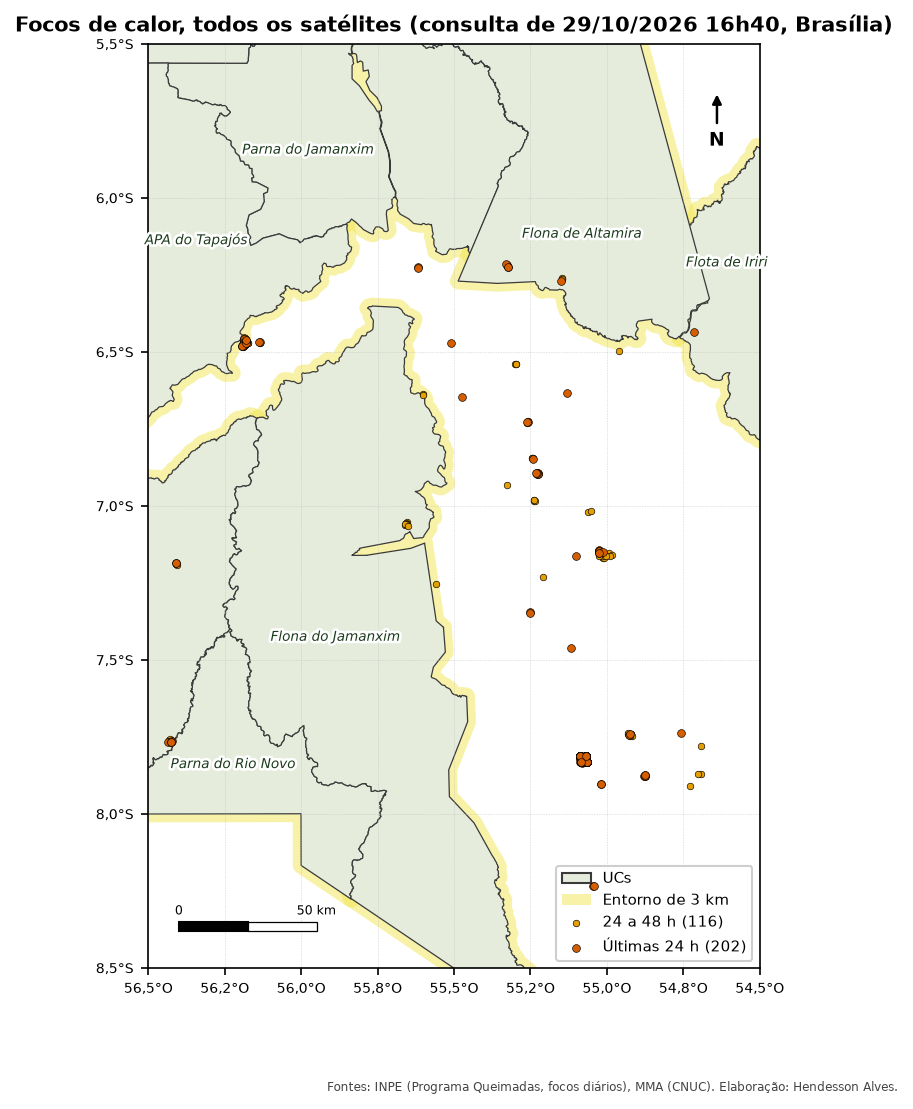
Where the hotspots come from
| Source | Address | Update |
|---|---|---|
| INPE, daily file | https://dataserver-coids.inpe.br/queimadas/queimadas/focos/csv/diario/Brasil/focos_diario_br_YYYYMMDD.csv |
today’s file grows during the day |
| INPE, every 10 minutes | https://dataserver-coids.inpe.br/queimadas/queimadas/focos/csv/10min/ |
10 minutes |
| NASA FIRMS (VIIRS and MODIS) | https://firms.modaps.eosdis.nasa.gov/data/active_fire/suomi-npp-viirs-c2/csv/SUOMI_VIIRS_C2_South_America_48h.csv |
a few hours; _24h and _7d files also exist |
The INPE file has one row per hotspot, with lat, lon, data_hora_gmt (date and time in UTC), satelite, municipio, estado, bioma and other fields.
A hotspot is a hot pixel seen by a satellite at one moment. The same fire shows up as dozens of hotspots, and the same hotspot can be seen by several satellites. Use hotspots to raise alerts and to compare periods with the reference satellite (AQUA_M-T). For burned area, use DETER burn scars or MapBiomas Fire.
What you will do
- Download the files for today, yesterday and the day before (to cover a full 48 hours).
- Turn
lonandlatinto points (SIRGAS 2000). - Filter by time (in UTC, as in the file).
- Find out which protected area (or surroundings) each hotspot fell in.
- Count by protected area, time window and satellite.
The code
Names in Portuguese: focos = hotspots, pasta = folder, agora = now, dia = day, corte = cutoff, janela = time window, ultimos = latest.
import arcpy
import urllib.request
from datetime import datetime, timedelta, timezone

arcpy.env.overwriteOutput = True
gpkg = r"C:\dados\artigos.gpkg"
pasta = r"C:\dados\focos"
url = ("https://dataserver-coids.inpe.br/queimadas/queimadas/focos/csv/diario/"
       "Brasil/focos_diario_br_{}.csv")

# 1 and 2. Download the three days and create the points
agora = datetime.now(timezone.utc)
pontos = []
for i in range(3):
    dia = (agora - timedelta(days=i)).strftime("%Y%m%d")
    csv = rf"{pasta}\focos_{dia}.csv"
    urllib.request.urlretrieve(url.format(dia), csv)
    pontos.append(arcpy.management.XYTableToPoint(
        csv, rf"memory\focos_{dia}", "lon", "lat",
        coordinate_system=arcpy.SpatialReference(4674)))
focos = arcpy.management.Merge(pontos, r"memory\focos")

# 3 and 4. Protected area of each hotspot and filter for the last 48 hours
focos_ucs = arcpy.analysis.PairwiseIntersect([focos, gpkg + r"\main.ucs"], r"memory\focos_ucs")
corte_48h = (agora - timedelta(hours=48)).strftime("%Y-%m-%d %H:%M:%S")
ultimos = arcpy.analysis.Select(focos_ucs, r"C:\dados\resultados.gdb\focos_ucs_48h",
                                f"data_hora_gmt >= timestamp '{corte_48h}'")

# 5. Count by protected area and satellite
arcpy.analysis.Statistics(ultimos, r"C:\dados\resultados.gdb\focos_por_uc",
[["id", "COUNT"]], ["nome_uc", "satelite"])XYTableToPoint reads data_hora_gmt as text or as a date, depending on the ArcGIS Pro version. If Select finds nothing, check the field type and change the filter to data_hora_gmt >= '{corte_48h}', which compares the text.
import os, tempfile, urllib.request
from datetime import datetime, timedelta, timezone
import processing

G = "C:/dados/artigos.gpkg"
url = ("https://dataserver-coids.inpe.br/queimadas/queimadas/focos/csv/diario/"
       "Brasil/focos_diario_br_{}.csv")

def rodar(alg, **p):
    p.setdefault("OUTPUT", "memory:")
    return processing.run(alg, p)["OUTPUT"]

# 1 and 2. Download the three days and open them as point layers (delimited text)
agora = datetime.now(timezone.utc)
camadas = []
for i in range(3):
    dia = (agora - timedelta(days=i)).strftime("%Y%m%d")
    csv = os.path.join(tempfile.gettempdir(), f"focos_{dia}.csv")
    urllib.request.urlretrieve(url.format(dia), csv)
    uri = (f"file:///{csv}?delimiter=,&xField=lon&yField=lat&crs=EPSG:4674"
           "&field=data_hora_gmt:text")
    camadas.append(QgsVectorLayer(uri, f"focos_{dia}", "delimitedtext"))
focos = rodar("native:mergevectorlayers", LAYERS=camadas, CRS="EPSG:4674")

# 3. Last 48 hours (text in YYYY-MM-DD HH:MM:SS format compares like a date)
corte = (agora - timedelta(hours=48)).strftime("%Y-%m-%d %H:%M:%S")
focos = rodar("native:extractbyexpression", INPUT=focos,
              EXPRESSION=f"\"data_hora_gmt\" >= '{corte}'")

# 4. Protected area of each hotspot (predicate 5 = "within")
focos_ucs = rodar("native:joinattributesbylocation", INPUT=focos,
                  JOIN=f"{G}|layername=ucs", PREDICATE=[5], JOIN_FIELDS=["nome_uc"],
                  METHOD=0, DISCARD_NONMATCHING=True)

# 5. Count by protected area and satellite
resumo = rodar("qgis:statisticsbycategories", INPUT=focos_ucs,
               CATEGORIES_FIELD_NAME=["nome_uc", "satelite"])
for f in resumo.getFeatures():
    print(f["nome_uc"], f["satelite"], f["count"])
QgsProject.instance().addMapLayer(focos_ucs)
The &field=data_hora_gmt:text in the layer address forces QGIS to read the date as text, so the filter works the same in any system language.
-- 1. Table for the hotspots and loading of the three files (\copy runs on your computer)
DROP TABLE IF EXISTS artigos.focos;
CREATE TABLE artigos.focos (
    id text, lat numeric, lon numeric, data_hora_gmt timestamp,
    satelite text, municipio text, estado text, pais text,
    municipio_id bigint, estado_id int, pais_id int,
    numero_dias_sem_chuva numeric, precipitacao numeric, risco_fogo numeric,
    bioma text, frp numeric
);
\copy artigos.focos FROM PROGRAM 'curl -s https://dataserver-coids.inpe.br/queimadas/queimadas/focos/csv/diario/Brasil/focos_diario_br_$(date -u +%Y%m%d).csv' CSV HEADER
\copy artigos.focos FROM PROGRAM 'curl -s https://dataserver-coids.inpe.br/queimadas/queimadas/focos/csv/diario/Brasil/focos_diario_br_$(date -u -d yesterday +%Y%m%d).csv' CSV HEADER
\copy artigos.focos FROM PROGRAM 'curl -s https://dataserver-coids.inpe.br/queimadas/queimadas/focos/csv/diario/Brasil/focos_diario_br_$(date -u -d "2 days ago" +%Y%m%d).csv' CSV HEADER

-- 2. Points
ALTER TABLE artigos.focos ADD COLUMN geom geometry(Point, 4674);
UPDATE artigos.focos SET geom = ST_SetSRID(ST_MakePoint(lon, lat), 4674);
CREATE INDEX ON artigos.focos USING gist (geom);

-- 3 to 5. Hotspots in protected areas in the last 24 and 48 hours (time in UTC)
SELECT u.nome_uc,
       count(*) FILTER (WHERE f.data_hora_gmt >= (now() AT TIME ZONE 'UTC') - interval '24 hours') AS focos_24h,
       count(*) AS focos_48h,
       count(*) FILTER (WHERE f.satelite = 'AQUA_M-T') AS focos_48h_referencia
FROM artigos.focos f
JOIN artigos.ucs u ON ST_Within(f.geom, u.geom)
WHERE f.data_hora_gmt >= (now() AT TIME ZONE 'UTC') - interval '48 hours'
GROUP BY u.nome_uc
ORDER BY focos_48h DESC;\copy … FROM PROGRAM needs curl, and on Windows replace $(date …) with the date written by hand. Another option is to download the files first and use \copy artigos.focos FROM 'focos.csv' CSV HEADER.
from datetime import datetime, timedelta, timezone
import pandas as pd
import geopandas as gpd

url = ("https://dataserver-coids.inpe.br/queimadas/queimadas/focos/csv/diario/"
       "Brasil/focos_diario_br_{}.csv")

# 1. Download today, yesterday and the day before
agora = datetime.now(timezone.utc)
dias = [(agora - timedelta(days=i)).strftime("%Y%m%d") for i in range(3)]
focos = pd.concat([pd.read_csv(url.format(d)) for d in dias], ignore_index=True)
focos["data_hora_gmt"] = pd.to_datetime(focos["data_hora_gmt"], utc=True)

# 2. Points and 3. last 48 hours
focos = gpd.GeoDataFrame(focos, geometry=gpd.points_from_xy(focos.lon, focos.lat), crs=4674)
focos = focos[focos["data_hora_gmt"] >= agora - timedelta(hours=48)]
focos["janela"] = (focos["data_hora_gmt"] >= agora - timedelta(hours=24)).map(
    {True: "last 24 h", False: "24 to 48 h"})

# 4. Which protected area (or surroundings) each hotspot fell in
G = "dados/artigos.gpkg"
zonas = pd.concat([
    gpd.read_file(G, layer="ucs")[["nome_uc", "geometry"]].assign(local="interior"),
    gpd.read_file(G, layer="ucs_entorno")[["nome_uc", "geometry"]].assign(local="entorno"),
])
focos_ucs = gpd.sjoin(focos, zonas, predicate="within")

# 5. Count
print(pd.crosstab([focos_ucs["nome_uc"], focos_ucs["local"]], focos_ucs["janela"],
                  margins=True, margins_name="total"))
print(focos_ucs[focos_ucs["satelite"] == "AQUA_M-T"].groupby("nome_uc").size())
focos_ucs.to_file("dados/focos_ucs_48h.gpkg")
Checking the result
The numbers change every run. On the afternoon of 2026-10-29, the three tested versions found the same hotspots inside the protected areas of the study area:
| Protected area | Last 24 h | Last 48 h | 48 h, AQUA_M-T only |
Surroundings, 48 h |
|---|---|---|---|---|
| Tapajós Environmental Protection Area | 17 | 34 | 5 | 41 |
| Altamira National Forest | 5 | 8 | 4 | 0 |
| Jamanxim National Forest | 0 | 8 | 0 | 3 |
| Iriri State Forest | 1 | 1 | 0 | 0 |
| Pouso Alto Environmental Protection Area (Cerrado) | 1 | 1 | 0 | 0 |
The same 52 hotspots inside the protected areas in all three versions. The difference between the all-satellites column (34) and the reference-satellite column (5) for the Tapajós Environmental Protection Area shows why you should not add up satellites to compare periods.
Running it on its own every day
This is the kind of script worth scheduling:
- Windows: Task Scheduler, calling
propy.bat script.py(ArcGIS Pro) orpython script.py. - ArcGIS Pro 3.x: right-click the script tool → Schedule.
- Linux/Mac:
crontab -eand a line such as0 7 * * * cd /dados && python focos.py.
To avoid piling up duplicate rows at each run, see Updating layers without duplicates.
Pitfalls
The data_hora_gmt field is in UTC (Brasília = UTC−3). If you filter “last 24 hours” using the computer clock, you lose or gain 3 hours of hotspots. Compute the cutoff in UTC, as in the code above.
On the same day, the study area had hotspots from 7 satellites. Adding them all gives a larger number that changes with the satellites in operation. To compare years or months, use only AQUA_M-T (the reference satellite). To alert the brigade, use all of them.
The current day’s file grows during the day. That is why the code downloads three files: only then is the last 48 hours complete at any time of day.
See also
- Inside and around protected areas, to build the surroundings layer
- Data sources (in Portuguese), with BDQueimadas and MapBiomas Fire
Updates
- 2026-10-29: first published, with data from INPE, MMA, IBAMA and SICAR from October 2026.
Reuse
Citation
@misc{alves2026,
  author = {Alves, Hendesson},
  publisher = {Hendesson Alves},
  title = {Fire Hotspots in Protected Areas over the Last 24 and 48
    Hours},
  date = {2026-10-29},
  url = {https://hendesson.github.io/en/articles/04-fire-hotspots.html},
  doi = {10.5281/zenodo.23780252},
  langid = {en},
  abstract = {INPE fire hotspots straight from the public server, no
    login needed: download the daily files, turn them into points,
    filter the last 24 and 48 hours in UTC and count by protected area.
    And why adding up hotspots from several satellites is misleading.}
}