Level Intermediate Reading 10 min Data October 2026 Programs ArcGIS 

Every week, one map per protected area with the new alerts: this is the kind of task that should not be done by hand. With 7 protected areas that is already 7 maps; with 130, nobody keeps up.
The scripts I used did this in ArcMap, with arcpy.mapping: they opened an .mxd, changed the layer filter, zoomed to the protected area and exported a JPEG. That module does not exist in ArcGIS Pro. Here is the same idea in each program, from the old script to the license-free version.
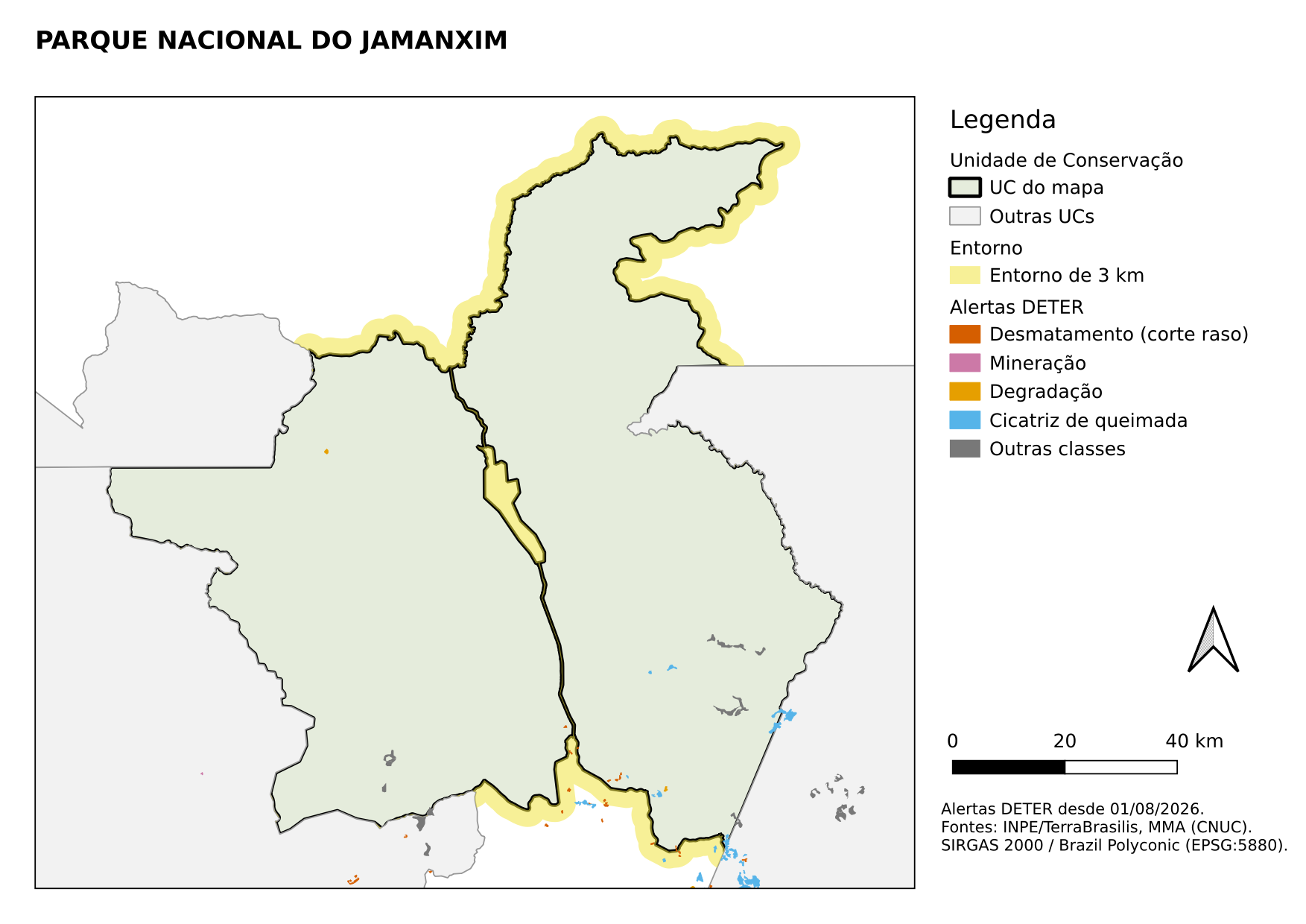
What every automated map needs
- A template (layout) with map, title, legend, scale bar, north arrow and source.
- A layer that drives the series (the protected areas): each feature becomes a page.
- Title and filters that change with the page (the protected area’s name, only its surroundings).
- Automatic zoom to the page’s feature, with a margin.
- Export with one file name per protected area (the CNUC code is better than the name, which has accents and spaces).
| Template | Series | Changing text | |
|---|---|---|---|
| ArcMap | .mxd |
Python loop with arcpy.mapping |
ListLayoutElements("TEXT_ELEMENT") |
| ArcGIS Pro | layout in the .aprx |
Map Series | dynamic text <dyn type="page" property="name"/> |
| QGIS | print layout | Atlas | expression [% "nome_uc" %] |
| Python | matplotlib figure | for loop |
f-string |
The code
Names in Portuguese: mapa = map, titulo = title, legenda = legend, escala = scale bar, norte = north arrow, fonte = source, quadro = map frame, colocar = place, regras = rules.
The old script, simplified. Runs only in ArcMap 10.x (Python 2.7).
# -*- coding: utf-8 -*-
import arcpy

mxd = arcpy.mapping.MapDocument(r"C:\dados\mapa_uc.mxd")
df = arcpy.mapping.ListDataFrames(mxd, "Layers")[0]
ucs = arcpy.mapping.ListLayers(mxd, "UCs", df)[0]
titulo = arcpy.mapping.ListLayoutElements(mxd, "TEXT_ELEMENT", "titulo")[0]

for cnuc, nome in arcpy.da.SearchCursor(ucs, ["cnuc", "nome_uc"]):
    ucs.definitionQuery = "cnuc = '%s'" % cnuc
    df.extent = ucs.getExtent()
    df.scale = df.scale * 1.1                      # 10% margin
    titulo.text = nome
    arcpy.mapping.ExportToPNG(mxd, r"C:\dados\mapas\mapa_%s.png" % cnuc, resolution=150)
    print "Map of %s exported" % nome
ucs.definitionQuery = ""
del mxd
To bring this layout into ArcGIS Pro, open a project and use Insert → Import Map with the .mxd.
Without code: in the layout, Layout → Map Series → Spatial, index layer = protected areas, name field = nome_uc. In the title, insert Dynamic Text → Map Series → Page Name. Then Share → Export Layout and choose “All pages” and “One file per page”.
With code (arcpy.mp), for full control of each step:
import arcpy

projeto = arcpy.mp.ArcGISProject(r"C:\dados\mapas.aprx")
layout = projeto.listLayouts("Mapa por UC")[0]
quadro = layout.listElements("MAPFRAME_ELEMENT")[0]
titulo = layout.listElements("TEXT_ELEMENT", "titulo")[0]
ucs = quadro.map.listLayers("UCs")[0]

for cnuc, nome in arcpy.da.SearchCursor(ucs, ["cnuc", "nome_uc"]):
    ucs.definitionQuery = f"cnuc = '{cnuc}'"
    quadro.camera.setExtent(quadro.getLayerExtent(ucs, False, True))
    quadro.camera.scale *= 1.1                     # 10% margin
    titulo.text = nome
    layout.exportToPNG(rf"C:\dados\mapas\mapa_{cnuc}.png", resolution=150)
    print(f"Map of {nome} exported")
ucs.definitionQuery = ""
If the layout already has a map series set up, exporting takes one line:
layout.mapSeries.exportToPDF(r"C:\dados\mapas\mapas.pdf", "ALL", multiple_files="PDF_SINGLE_FILE")Without code: in the print layout, Atlas → Generate an atlas tab, coverage layer = protected areas, file name = 'mapa_' || "cnuc". On the map item, check Controlled by atlas with a 10% margin. In the title, use Insert expression with [% "nome_uc" %]. Export with Atlas → Export atlas as images.
With code (Python console), the whole layout built from scratch, to run on any computer:
import os
from qgis.core import (QgsProject, QgsVectorLayer, QgsPrintLayout, QgsLayoutItemMap,
                       QgsLayoutItemLabel, QgsLayoutItemLegend, QgsLayoutItemScaleBar,
                       QgsLayoutItemPicture, QgsLayoutPoint, QgsLayoutSize, QgsUnitTypes,
                       QgsLayoutExporter, QgsCategorizedSymbolRenderer, QgsRendererCategory,
                       QgsFillSymbol, QgsSingleSymbolRenderer, QgsCoordinateReferenceSystem,
                       QgsCoordinateTransform, QgsRuleBasedRenderer)
from qgis.PyQt.QtGui import QFont

G = "C:/dados/artigos.gpkg"
PASTA = "C:/dados/mapas/"
os.makedirs(PASTA, exist_ok=True)
projeto = QgsProject.instance()
MM = QgsUnitTypes.LayoutMillimeters

def poligono(**estilo):
    return QgsFillSymbol.createSimple(estilo)

# 1. Layers and styles: protected areas (they drive the atlas), surroundings and alerts since Aug 2026
ucs = QgsVectorLayer(f"{G}|layername=ucs", "Protected area", "ogr")
ucs.setSubsetString("regiao = 'Amazonia'")
extensao_ucs = ucs.extent()
def regras(*lista):
    """Rule-based style: (label, expression, symbol). @atlas_feature is the page's protected area."""
    raiz = QgsRuleBasedRenderer.Rule(None)
    for rotulo, expressao, simbolo in lista:
        raiz.appendChild(QgsRuleBasedRenderer.Rule(simbolo, filterExp=expressao, label=rotulo))
    return QgsRuleBasedRenderer(raiz)

ucs.setRenderer(regras(
    ("Mapped protected area", "@atlas_featureid = $id",
     poligono(color="229,236,220", outline_color="0,0,0", outline_width="0.8")),
    ("Other protected areas", "@atlas_featureid <> $id",
     poligono(color="242,242,242", outline_color="150,150,150", outline_width="0.3"))))
entorno = QgsVectorLayer(f"{G}|layername=ucs_entorno", "Surroundings", "ogr")
entorno.setRenderer(regras(
    ("3 km surroundings", "\"cnuc\" = attribute(@atlas_feature, 'cnuc')",
     poligono(color="240,228,66,140", outline_style="no"))))
alertas = QgsVectorLayer(f"{G}|layername=deter", "DETER alerts", "ogr")
alertas.setSubsetString("view_date >= '2026-08-01'")
classes = [("DESMATAMENTO_CR", "213,94,0", "Deforestation (clear-cut)"),
           ("MINERACAO", "204,121,167", "Mining"),
           ("DEGRADACAO", "230,159,0", "Degradation"),
           ("CICATRIZ_DE_QUEIMADA", "86,180,233", "Burn scar")]
categorias = [QgsRendererCategory(valor, poligono(color=cor, outline_color=cor,
                                                  outline_width="0.15"), rotulo)
              for valor, cor, rotulo in classes]
categorias.append(QgsRendererCategory(None, poligono(color="120,120,120", outline_style="no"),
                                      "Other classes"))
alertas.setRenderer(QgsCategorizedSymbolRenderer("classname", categorias))
projeto.addMapLayers([ucs, entorno, alertas])

# 2. Landscape A4 layout (each item is added and then placed, in millimeters)
layout = QgsPrintLayout(projeto)
layout.initializeDefaults()

def colocar(item, x, y, largura=None, altura=None):
    layout.addLayoutItem(item)
    item.attemptMove(QgsLayoutPoint(x, y, MM))
    if largura:
        item.attemptResize(QgsLayoutSize(largura, altura, MM))
    return item

mapa = QgsLayoutItemMap(layout)
crs_mapa = QgsCoordinateReferenceSystem("EPSG:5880")       # in meters: correct scale
mapa.setCrs(crs_mapa)
mapa.setLayers([alertas, entorno, ucs])
mapa.setFrameEnabled(True)
colocar(mapa, 8, 22, 200, 180)
# Initial extent: without it, the atlas stretches the map frame on the first page
para_metros = QgsCoordinateTransform(ucs.crs(), crs_mapa, projeto)
mapa.zoomToExtent(para_metros.transformBoundingBox(extensao_ucs))

titulo = QgsLayoutItemLabel(layout)
titulo.setText('[% "nome_uc" %]')                            # changes on every page
titulo.setFont(QFont("DejaVu Sans", 16, QFont.Weight.Bold))
colocar(titulo, 8, 6, 280, 12)

legenda = QgsLayoutItemLegend(layout)
legenda.setLinkedMap(mapa)
legenda.setTitle("Legend")
colocar(legenda, 214, 22)

norte = QgsLayoutItemPicture(layout)
norte.setPicturePath(":/images/north_arrows/layout_default_north_arrow.svg")
colocar(norte, 270, 138, 15, 15)
norte.setLinkedMap(mapa)

escala = QgsLayoutItemScaleBar(layout)
escala.setLinkedMap(mapa)
escala.setStyle("Single Box")
escala.setUnits(QgsUnitTypes.DistanceKilometers)
escala.setUnitLabel("km")
escala.setNumberOfSegments(2)
escala.setNumberOfSegmentsLeft(0)
escala.setUnitsPerSegment(20)
colocar(escala, 214, 165)

fonte = QgsLayoutItemLabel(layout)
fonte.setText("DETER alerts since 2026-08-01.\nSources: INPE/TerraBrasilis, MMA (CNUC).\n"
              "SIRGAS 2000 / Brazil Polyconic (EPSG:5880).")
colocar(fonte, 214, 182, 80, 20)

# 3. Atlas: one page per protected area, map centered on it with a 10% margin
atlas = layout.atlas()
atlas.setCoverageLayer(ucs)
atlas.setEnabled(True)
atlas.setFilenameExpression("'mapa_' || \"cnuc\"")
mapa.setAtlasDriven(True)
mapa.setAtlasScalingMode(QgsLayoutItemMap.Auto)
mapa.setAtlasMargin(0.10)

# 4. One PNG image per protected area
config = QgsLayoutExporter.ImageExportSettings()
config.dpi = 150
config.generateWorldFile = False
config.exportMetadata = False
resultado, erro = QgsLayoutExporter.exportToImage(atlas, PASTA + "mapa.png", "png", config)
print("export:", "ok" if resultado == QgsLayoutExporter.Success else erro)
print(sorted(os.listdir(PASTA)))
The two tricks that make the atlas look hand-made are in the rule-based style:
@atlas_featureid = $idhighlights the page’s protected area and leaves the neighbors in grey;"cnuc" = attribute(@atlas_feature, 'cnuc')shows only the surroundings of the page’s protected area.
PostGIS does not draw maps, but it can deliver ready-made layers to QGIS or ArcGIS Pro. A view with each protected area’s recent alerts keeps the map project light and always up to date:
CREATE OR REPLACE VIEW artigos.mapa_alertas_recentes AS
SELECT d.gid, d.classname, d.view_date, z.cnuc, z.nome_uc, z.local, z.geom
FROM artigos.deter_interior_entorno z
JOIN artigos.deter d USING (gid)
WHERE d.view_date >= current_date - 90;
In QGIS, connect to the database (Browser → PostgreSQL → New Connection), drag the view onto the map and use the atlas from the QGIS tab. Every time the database is updated, the atlas comes out with the new data.
No GIS program at all: a loop that draws and saves one PNG per protected area.
import os
import geopandas as gpd
import matplotlib
matplotlib.use("Agg")
import matplotlib.pyplot as plt
from matplotlib.patches import Patch

G = "dados/artigos.gpkg"
os.makedirs("dados/mapas_py", exist_ok=True)
ucs = gpd.read_file(G, layer="ucs").query("regiao == 'Amazonia'").to_crs(5880)
entorno = gpd.read_file(G, layer="ucs_entorno").to_crs(5880)
alertas = gpd.read_file(G, layer="deter").to_crs(5880)
alertas = alertas[alertas["view_date"].astype(str) >= "2026-08-01"]

CORES = {"DESMATAMENTO_CR": ("#D55E00", "Deforestation (clear-cut)"),
         "MINERACAO": ("#CC79A7", "Mining"), "DEGRADACAO": ("#E69F00", "Degradation"),
         "CICATRIZ_DE_QUEIMADA": ("#56B4E9", "Burn scar")}
alertas["cor"] = alertas["classname"].map(lambda c: CORES.get(c, ("#787878", ""))[0])

for _, uc in ucs.iterrows():
    fig, ax = plt.subplots(figsize=(11.7, 8.3))                    # landscape A4
    xmin, ymin, xmax, ymax = uc.geometry.bounds
    m = 0.10 * max(xmax - xmin, ymax - ymin)                       # 10% margin
    ax.set_xlim(xmin - m, xmax + m)
    ax.set_ylim(ymin - m, ymax + m)

    ucs.plot(ax=ax, color="#f2f2f2", edgecolor="#969696", linewidth=0.4)
    entorno[entorno["cnuc"] == uc["cnuc"]].plot(ax=ax, color="#F0E442", alpha=0.55)
    ucs[ucs["cnuc"] == uc["cnuc"]].plot(ax=ax, color="#e5ecdc", edgecolor="black", linewidth=1.2)
    alertas.plot(ax=ax, color=alertas["cor"], linewidth=0)

    # 20 km scale bar, north arrow, legend, title and source
    x0, y0 = ax.get_xlim()[0] + m * 0.4, ax.get_ylim()[0] + m * 0.4
    ax.plot([x0, x0 + 20_000], [y0, y0], color="black", linewidth=3)
    ax.text(x0 + 10_000, y0 + m * 0.12, "20 km", ha="center", fontsize=9)
    ax.annotate("N", xy=(0.95, 0.95), xytext=(0.95, 0.86), xycoords="axes fraction",
                ha="center", fontsize=12, fontweight="bold",
                arrowprops=dict(facecolor="black", width=4, headwidth=12))
    itens = [Patch(facecolor="#e5ecdc", edgecolor="black", label="Mapped protected area"),
             Patch(facecolor="#F0E442", alpha=0.55, label="3 km surroundings")]
    itens += [Patch(color=cor, label=rotulo) for cor, rotulo in CORES.values()]
    ax.legend(handles=itens, loc="upper left", fontsize=9, framealpha=0.9)
    ax.set_title(uc["nome_uc"], fontsize=15, fontweight="bold", loc="left")
    ax.set_axis_off()
    fig.text(0.01, 0.01, "DETER alerts since 2026-08-01. Sources: INPE/TerraBrasilis, "
             "MMA (CNUC). SIRGAS 2000 / Brazil Polyconic (EPSG:5880).", fontsize=8)
    fig.savefig(f"dados/mapas_py/mapa_{uc['cnuc']}.png", dpi=150, bbox_inches="tight")
    plt.close(fig)
    print("Map of", uc["nome_uc"], "exported")
Checking the result
The QGIS Atlas and the Python loop produced the 7 maps of the study area, one per protected area, in a few seconds. The ArcMap and ArcGIS Pro versions follow the same logic, but were not tested here (they need a license).
Pitfalls
A map in geographic SIRGAS 2000 (degrees) has a distorted scale bar, and the protected areas look “squashed” vertically. Put the map frame in a projection in meters (here, EPSG:5880), even if the data stay in degrees.
When building the layout in Python, if the map starts without an extent, the first atlas page changes the size of the frame and it runs off the page. Give the map an initial extent (zoomToExtent) before turning on the atlas, as in the code above.
Use the protected area code (mapa_0000.00.0267.png), not the name. Accents, spaces and slashes in file names break scripts and links, especially between Windows and Linux.
See also
- Automated PDF report, which combines map, table and text
- Black-and-white academic maps in R (in Portuguese), on the elements of a good map
Updates
- 2026-10-29: first published, with data from INPE, MMA, IBAMA and SICAR from October 2026.
Reuse
Citation
@misc{alves2026,
  author = {Alves, Hendesson},
  publisher = {Hendesson Alves},
  title = {One Map Per Protected Area, Automatically: From {ArcMap} to
    {QGIS} and {Python}},
  date = {2026-10-29},
  url = {https://hendesson.github.io/en/articles/10-automated-maps.html},
  doi = {10.5281/zenodo.23780264},
  langid = {en},
  abstract = {One map per protected area, generated without clicking:
    ArcMap’s arcpy.mapping, ArcGIS Pro’s arcpy.mp and map series, the
    QGIS Atlas built from code, and a matplotlib loop.}
}