flowchart LR
    A["PRODES 2025<br/>polygons"] --> B["Point inside<br/>each polygon"]
    B --> C["Kernel weighted<br/>by area"]
    B --> D["Unweighted kernel<br/>(count)"]
    C --> E["Normalize<br/>0 to 1"]
    D --> F["Normalize<br/>0 to 1"]
    E --> G["Average"]
    F --> G
    G --> H["Mean by<br/>protected area"]
Level Intermediate Reading 11 min Data October 2026 Programs ArcGIS 


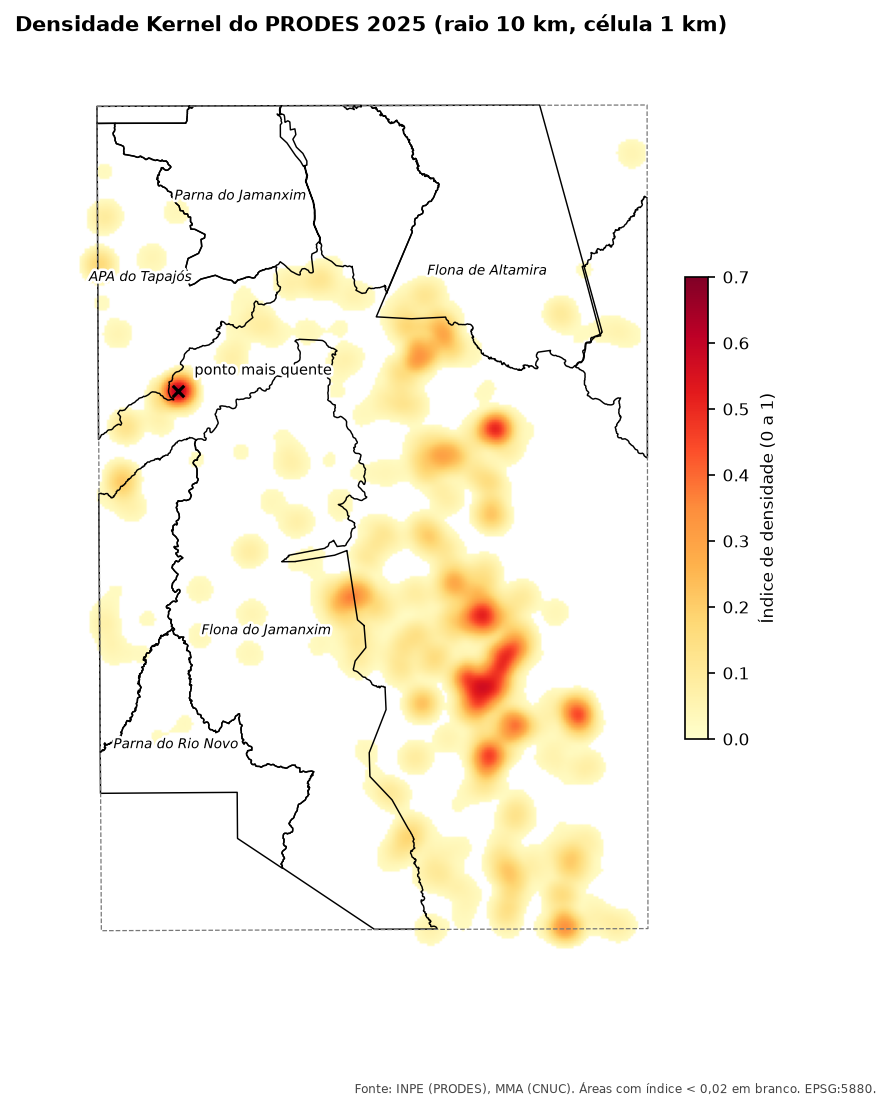
A map with 1,600 small deforestation polygons is hard to read. Kernel density spreads each polygon over a neighborhood and adds everything into a continuous surface: the result is a heat map that shows where deforestation is concentrated.
The script I used computed two densities, one weighted by polygon area and one by count only, normalized each between 0 and 1 and took the average. That way, both one large clearing and many small ones show up as “hot”. Then it computed the mean index inside each protected area.
How it works
- Search radius: how far each point “spreads” its influence. Here, 10 km.
- Cell size: the resolution of the map. Here, 1 km.
- Quartic kernel: the weight falls smoothly from the center (maximum weight) to the edge of the radius (zero). It is the default in ArcGIS and QGIS.
- Study area: we only downloaded deforestation inside a rectangle. Outside it, the density would be zero without really being zero, so the map and the means by protected area stay inside the study area.
- Normalize:
(value − minimum) / (maximum − minimum). Each program computes density on a different scale, but after normalizing the results are comparable.
WarningWork in meters
The old script used a radius of 0.777 and a cell of 0.0015, in degrees. A degree of longitude is about 111 km at the Equator and less further south, so the search “circle” becomes an ellipse. Reproject to a projection in meters (here, EPSG:5880) and write radius and cell size in meters.
The code
Data: layers prodes_amz (year 2025) and ucs of the articles’ GeoPackage (how to download). Names in Portuguese: pontos = points, peso = weight, recorte = study area, indice = index, kd_qtde = count density, RAIO = radius, CEL = cell.
Requires the Spatial Analyst extension.
import arcpy
from arcpy.sa import KernelDensity

arcpy.CheckOutExtension("Spatial")
arcpy.env.overwriteOutput = True
arcpy.env.outputCoordinateSystem = arcpy.SpatialReference(5880)   # meters
gpkg = r"C:\dados\artigos.gpkg"
gdb = r"C:\dados\resultados.gdb"

# Downloaded area (the study area): the map and the means stay inside it
recorte = arcpy.Extent(-56.5, -8.5, -54.5, -5.5, spatial_reference=arcpy.SpatialReference(4674))
arcpy.env.extent = recorte.projectAs(arcpy.SpatialReference(5880))

# 1. 2025 polygons, area in hectares and a point inside each one
prodes = arcpy.analysis.Select(gpkg + r"\main.prodes_amz", r"memory\prodes",
                               "year = 2025 AND UPPER(main_class) = 'DESMATAMENTO'")
arcpy.management.RepairGeometry(prodes)
arcpy.management.CalculateGeometryAttributes(
    prodes, [["area_ha", "AREA_GEODESIC"]], area_unit="HECTARES")
pontos = arcpy.management.FeatureToPoint(prodes, r"memory\pontos", "INSIDE")

# 2. Two densities: weighted by area and unweighted (1 km cell, 10 km radius)
kd_area = KernelDensity(pontos, "area_ha", 1000, 10000, "SQUARE_KILOMETERS")
kd_qtde = KernelDensity(pontos, "NONE", 1000, 10000, "SQUARE_KILOMETERS")

# 3. Normalize each one between 0 and 1 and take the average
def normalizar(r):
    arcpy.management.CalculateStatistics(r)
    return (r - r.minimum) / (r.maximum - r.minimum)

indice = (normalizar(kd_area) + normalizar(kd_qtde)) / 2
indice.save(gdb + r"\kernel_indice")

# 4. Mean and maximum of the index in each protected area, only inside the study area
ucs = arcpy.analysis.Select(gpkg + r"\main.ucs", r"memory\ucs", "regiao = 'Amazonia'")
ucs = arcpy.analysis.Clip(ucs, recorte.polygon, r"memory\ucs_recorte")
arcpy.sa.ZonalStatisticsAsTable(ucs, "nome_uc", indice, gdb + r"\kernel_por_uc",
                                "DATA", "MEAN_STD")
Note
The original script normalized with ZonalStatistics (minimum and maximum per zone). With a single zone, the raster’s r.minimum and r.maximum give the same result in one line.
import processing
G = "C:/dados/artigos.gpkg"
SAIDA = "C:/dados/"

def rodar(alg, **p):
    p.setdefault("OUTPUT", "memory:")
    return processing.run(alg, p)["OUTPUT"]

# 1. 2025 polygons, area in hectares and a point inside each one (in meters)
prodes = rodar("native:extractbyexpression", INPUT=f"{G}|layername=prodes_amz",
               EXPRESSION="year = 2025 AND upper(main_class) = 'DESMATAMENTO'")
prodes = rodar("native:fixgeometries", INPUT=prodes)
prodes = rodar("native:removenullgeometries", INPUT=prodes, REMOVE_EMPTY=True)  # slivers
prodes = rodar("native:fieldcalculator", INPUT=prodes, FIELD_NAME="area_ha", FIELD_TYPE=0,
               FIELD_PRECISION=4,
               FORMULA="area(transform($geometry, 'EPSG:4674', 'ESRI:102033')) / 10000")
pontos = rodar("native:pointonsurface", INPUT=prodes)
pontos = rodar("native:reprojectlayer", INPUT=pontos, TARGET_CRS="EPSG:5880")

# 2. Heat map (quartic kernel), weighted and unweighted
kernel = dict(INPUT=pontos, RADIUS=10000, PIXEL_SIZE=1000, KERNEL=0, OUTPUT_VALUE=0)
kd_area = rodar("native:heatmapkerneldensityestimation", **kernel, WEIGHT_FIELD="area_ha",
                OUTPUT=SAIDA + "kd_area.tif")
kd_qtde = rodar("native:heatmapkerneldensityestimation", **kernel,
                OUTPUT=SAIDA + "kd_qtde.tif")

# 3. Normalize (0 to 1) and take the average
norm_area = rodar("native:rescaleraster", INPUT=kd_area, BAND=1, MINIMUM=0, MAXIMUM=1,
                  OUTPUT=SAIDA + "kd_area_norm.tif")
norm_qtde = rodar("native:rescaleraster", INPUT=kd_qtde, BAND=1, MINIMUM=0, MAXIMUM=1,
                  OUTPUT=SAIDA + "kd_qtde_norm.tif")
indice = rodar("gdal:rastercalculator", INPUT_A=norm_area, BAND_A=1, INPUT_B=norm_qtde,
               BAND_B=1, FORMULA="(A + B) / 2", RTYPE=5, OUTPUT=SAIDA + "kernel_media.tif")

# The heat map only covers the points' extent plus the radius, and writes "no data" where the
# density is zero: extend it to the study area and replace "no data" with zero
indice = rodar("gdal:warpreproject", INPUT=indice, TARGET_CRS="EPSG:5880",
               TARGET_RESOLUTION=1000, TARGET_EXTENT="-56.5,-54.5,-8.5,-5.5",
               TARGET_EXTENT_CRS="EPSG:4674", OUTPUT=SAIDA + "kernel_recorte.tif")
indice = rodar("native:fillnodata", INPUT=indice, BAND=1, FILL_VALUE=0,
               OUTPUT=SAIDA + "kernel_indice.tif")

# 4. Mean and maximum of the index in each protected area, only inside the study area
ucs = rodar("native:extractbyexpression", INPUT=f"{G}|layername=ucs",
            EXPRESSION="regiao = 'Amazonia'")
ucs = rodar("native:extractbyextent", INPUT=ucs, CLIP=True,
            EXTENT="-56.5,-54.5,-8.5,-5.5 [EPSG:4674]")
ucs = rodar("native:fixgeometries", INPUT=ucs)
ucs = rodar("native:reprojectlayer", INPUT=ucs, TARGET_CRS="EPSG:5880")
por_uc = rodar("native:zonalstatisticsfb", INPUT=ucs, INPUT_RASTER=indice, RASTER_BAND=1,
               STATISTICS=[2, 6], COLUMN_PREFIX="idx_")          # 2 = mean, 6 = maximum
for f in por_uc.getFeatures():
    print(f["nome_uc"], round(f["idx_mean"], 3), round(f["idx_max"], 3))
QgsProject.instance().addMapLayer(QgsRasterLayer(indice, "Kernel index"))
Heatmap is under Processing → Interpolation (in QGIS 3, the ID is qgis:heatmapkerneldensityestimation). From the menus, step 3 is Rescale raster twice and a Raster calculator with ("norm_area@1" + "norm_qtde@1") / 2.
PostGIS computes a kernel without rasters: a grid of points every 1 km and, for each grid point, the sum of the quartic weights of the deforestation within 10 km.
-- 1. A point inside each 2025 polygon (in meters) and the area in hectares
DROP TABLE IF EXISTS artigos.kernel_pontos;
CREATE TABLE artigos.kernel_pontos AS
SELECT ST_Transform(ST_PointOnSurface(g), 5880) AS geom,
       ST_Area(g::geography) / 10000 AS area_ha
FROM (SELECT ST_CollectionExtract(ST_MakeValid(geom), 3) AS g
      FROM artigos.prodes_amz
      WHERE year = 2025 AND upper(main_class) = 'DESMATAMENTO') p
WHERE NOT ST_IsEmpty(g);
CREATE INDEX ON artigos.kernel_pontos USING gist (geom);

-- 2. 1 km grid over the points' extent (plus a 10 km margin) and the two densities
DROP TABLE IF EXISTS artigos.kernel_grade;
CREATE TABLE artigos.kernel_grade AS
WITH grade AS (
    SELECT ST_Centroid(c.geom) AS geom
    FROM ST_SquareGrid(1000, (SELECT ST_SetSRID(ST_Expand(ST_Extent(geom), 10000)::geometry, 5880)
                              FROM artigos.kernel_pontos)) AS c
),
quartico AS (                       -- weight: (1 - (d/r)²)², from 1 at the center to 0 at 10 km
    SELECT g.geom, p.area_ha,
           power(1 - power(ST_Distance(g.geom, p.geom) / 10000, 2), 2) AS w
    FROM grade g
    JOIN artigos.kernel_pontos p ON ST_DWithin(g.geom, p.geom, 10000)
)
SELECT geom, sum(w * area_ha) AS kd_area, sum(w) AS kd_qtde
FROM quartico
GROUP BY geom;

-- 3. Normalize and average (cells with no deforestation nearby stay at 0)
ALTER TABLE artigos.kernel_grade ADD COLUMN indice numeric;
WITH lim AS (SELECT max(kd_area) AS ma, max(kd_qtde) AS mq FROM artigos.kernel_grade)
UPDATE artigos.kernel_grade SET indice = ((kd_area / ma) + (kd_qtde / mq)) / 2 FROM lim;
CREATE INDEX ON artigos.kernel_grade USING gist (geom);

-- 4. Mean and maximum of the index in each protected area, only inside the study area
--    (cells with zero count)
WITH ucs AS (
    SELECT nome_uc,
           ST_Transform(ST_Intersection(geom, ST_MakeEnvelope(-56.5, -8.5, -54.5, -5.5, 4674)),
                        5880) AS geom
    FROM artigos.ucs
    WHERE regiao = 'Amazonia'
)
SELECT u.nome_uc,
       round(avg(coalesce(k.indice, 0)), 3) AS idx_media,
       round(max(coalesce(k.indice, 0)), 3) AS idx_max
FROM ucs u
CROSS JOIN LATERAL ST_SquareGrid(1000, u.geom) AS c
LEFT JOIN artigos.kernel_grade k ON k.geom = ST_Centroid(c.geom)
WHERE ST_Intersects(ST_Centroid(c.geom), u.geom)
GROUP BY u.nome_uc
ORDER BY idx_media DESC;
The minimum of each density is zero (far from any deforestation), so normalization becomes just value / maximum.
import numpy as np
import geopandas as gpd
from shapely.geometry import box
from rasterio.transform import from_origin
from rasterstats import zonal_stats

G = "dados/artigos.gpkg"
RAIO, CEL = 10_000, 1_000                         # meters
recorte = gpd.GeoSeries([box(-56.5, -8.5, -54.5, -5.5)], crs=4674)

# 1. 2025 polygons, area in hectares and a point inside each one (in meters)
prodes = gpd.read_file(G, layer="prodes_amz")
prodes = prodes[(prodes["year"] == 2025) & (prodes["main_class"].str.upper() == "DESMATAMENTO")]
prodes["geometry"] = prodes.make_valid(method="structure", keep_collapsed=False)
prodes = prodes[~prodes.is_empty]
peso = prodes.to_crs("ESRI:102033").area.values / 10_000
pontos = prodes.representative_point().to_crs(5880)
x, y = pontos.x.values, pontos.y.values

# 2. 1 km grid over the study area and quartic kernel, point by point
xmin, ymin, xmax, ymax = recorte.to_crs(5880).total_bounds
x0, y1 = xmin, ymax
ncol = int((xmax - x0) // CEL) + 1
nlin = int((y1 - ymin) // CEL) + 1
cx = x0 + (np.arange(ncol) + 0.5) * CEL           # column centers
cy = y1 - (np.arange(nlin) + 0.5) * CEL           # row centers
kd_area = np.zeros((nlin, ncol))
kd_qtde = np.zeros((nlin, ncol))
for xi, yi, wi in zip(x, y, peso):
    c = slice(max(0, int((xi - RAIO - x0) // CEL)), int((xi + RAIO - x0) // CEL) + 1)
    l = slice(max(0, int((y1 - yi - RAIO) // CEL)), int((y1 - yi + RAIO) // CEL) + 1)
    d2 = (cx[c][None, :] - xi) ** 2 + (cy[l][:, None] - yi) ** 2
    k = np.where(d2 < RAIO ** 2, (1 - d2 / RAIO ** 2) ** 2, 0)
    kd_area[l, c] += wi * k
    kd_qtde[l, c] += k

# 3. Normalize (the minimum is zero) and take the average
indice = (kd_area / kd_area.max() + kd_qtde / kd_qtde.max()) / 2

# 4. Mean and maximum of the index in each protected area, only inside the study area
ucs = gpd.read_file(G, layer="ucs").query("regiao == 'Amazonia'")
ucs = gpd.clip(ucs, recorte).to_crs(5880)
stats = zonal_stats(ucs, indice, affine=from_origin(x0, y1, CEL, CEL),
                    stats=["mean", "max"], nodata=-1)
ucs["idx_media"] = [round(s["mean"], 3) for s in stats]
ucs["idx_max"] = [round(s["max"], 3) for s in stats]
print(ucs[["nome_uc", "idx_media", "idx_max"]].sort_values("idx_media", ascending=False))
np.save("dados/kernel_indice.npy", indice)
Checking the result
The three tested versions gave the same means by protected area (differences up to 0.001). The maximum varies a little more (up to 0.02), because each program aligns the cell grid differently:
| Protected area (part inside the study area) | Mean index | Maximum (QGIS / PostGIS / Python) |
|---|---|---|
| Jamanxim National Forest | 0.014 | 0.36 / 0.37 / 0.37 |
| Tapajós Environmental Protection Area | 0.013–0.014 | 0.49 / 0.47 / 0.47 |
| Altamira National Forest | 0.008 | 0.19 / 0.18 / 0.19 |
| Iriri State Forest | 0.005–0.006 | 0.06 / 0.06 / 0.06 |
| Rio Novo National Park | 0.002 | 0.03 / 0.03 / 0.03 |
| Jamanxim National Park | 0.001 | 0.09 / 0.08 / 0.08 |
| Itaituba I National Forest | 0 | 0 / 0 / 0 |
The means are low because the protected areas are huge and most of each one is far from any deforestation. The maximum says more: the Tapajós Environmental Protection Area and Jamanxim National Forest have points with almost half the intensity of the hottest point in the study area. That point (the X on the map) lies outside the protected areas, on the border between the Tapajós Environmental Protection Area and Jamanxim National Forest, and most of the heat is in a band east of Jamanxim National Forest, also outside the protected areas.
Choosing the radius
The radius changes everything. With 2 km, each clearing becomes an isolated spot; with 50 km, the whole map turns lukewarm. There is no “right” radius: choose it by the scale of the decision (the working range of a field team, for example) and write the value in the legend. The article Prioritizing alerts in ArcGIS Pro and QGIS shows another way to look at concentration, by grouping nearby polygons.
See also
- Annual PRODES deforestation in protected areas
- Spatial data concepts (in Portuguese): raster, resolution and projections
Updates
- 2026-10-29: first published, with data from INPE, MMA, IBAMA and SICAR from October 2026.
Reuse
Citation
BibTeX citation:
@misc{alves2026,
  author = {Alves, Hendesson},
  publisher = {Hendesson Alves},
  title = {Kernel Density of Deforestation: Where the Pressure Is
    Concentrated},
  date = {2026-10-29},
  url = {https://hendesson.github.io/en/articles/09-kernel-density.html},
  doi = {10.5281/zenodo.23780262},
  langid = {en},
  abstract = {A heat map of PRODES 2025 deforestation that combines area
    and number of polygons into an index from 0 to 1, with radius and
    cell size in meters. It also shows how to compute a kernel density
    in PostGIS without rasters, and why normalizing makes the programs
    comparable.}
}
For attribution, please cite this work as:
Alves, Hendesson. 2026. “Kernel Density of Deforestation: Where
the Pressure Is Concentrated.” In Geoprocessing Articles for
Environmental Monitoring. Preprint, Hendesson Alves, October 29. https://doi.org/10.5281/zenodo.23780262.