Level Intermediate Reading 10 min Data October 2026 Programs ArcGIS 

The longest scripts in my folder did no spatial analysis at all: they built an information note in PDF, with logos, a legend, a table per protected area and the text of each occurrence. That was 1,500 lines of fpdf, and any layout change was a chore.
Here is the same kind of product, a deforestation bulletin per protected area with public data, in four ways. The easiest to maintain is usually Quarto: the layout lives in a text file and the script only changes the protected area.
What goes into the bulletin
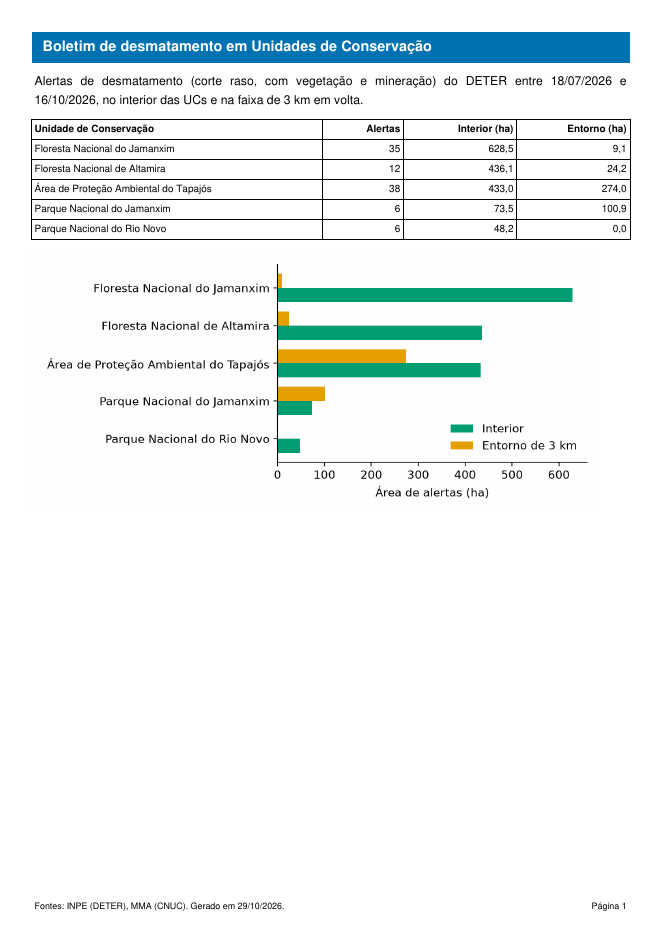
- Period and source, computed from the data itself (never typed in).
- Summary table: area of alerts inside and around each protected area.
- A chart of the table.
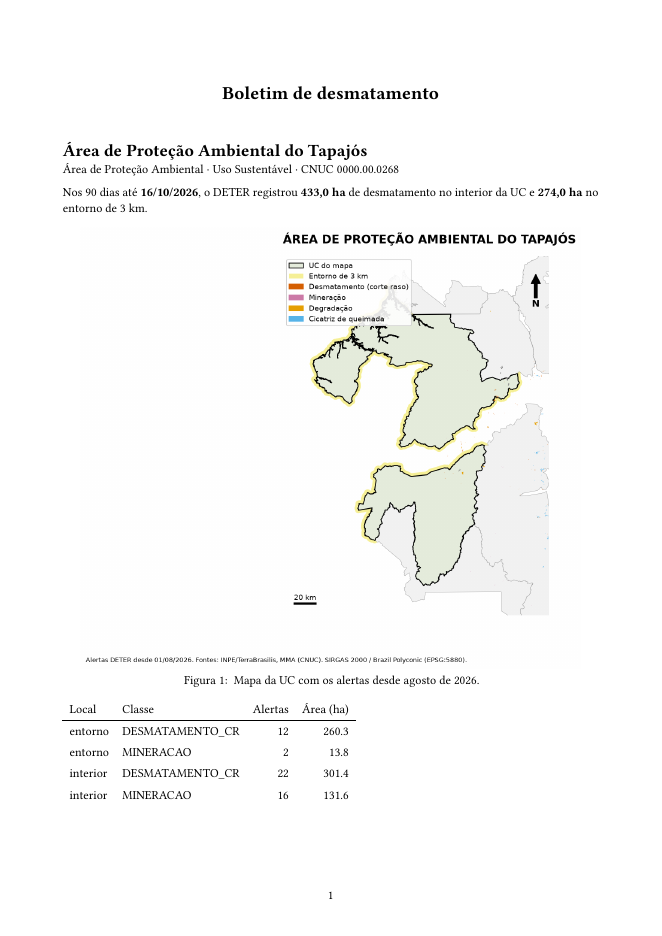
- One page per protected area, with the map from the previous article.
The data come from the deter_interior_entorno layer (article Inside and around): deforestation alerts (clear-cut, with vegetation and mining) from the last 90 days.
The code
Names in Portuguese: boletim = bulletin, relatorio = report, tabela = table, grafico = chart, inicio/fim = start/end, nome = name.
ArcGIS Pro has Reports (Insert → Report), which build the table per protected area with header and footer, and Map Series in the layout. The script combines both into a PDF:
import arcpy

projeto = arcpy.mp.ArcGISProject(r"C:\dados\boletim.aprx")

# Table by protected area (report created in Insert → Report, grouped by nome_uc)
relatorio = projeto.listReports("Alertas por UC")[0]
relatorio.exportToPDF(r"C:\dados\saida\tabela.pdf")

# One map per protected area (layout with a map series set up)
layout = projeto.listLayouts("Mapa por UC")[0]
layout.mapSeries.exportToPDF(r"C:\dados\saida\mapas.pdf")

# Join everything into a single file
boletim = arcpy.mp.PDFDocumentCreate(r"C:\dados\saida\boletim.pdf")
boletim.appendPages(r"C:\dados\saida\tabela.pdf")
boletim.appendPages(r"C:\dados\saida\mapas.pdf")
boletim.saveAndClose()
The fpdf2 code from the Python tab also runs in ArcGIS Pro: in the Package Manager, clone the default environment, activate the clone and install fpdf2. That is how the original scripts worked.
The QGIS Atlas exports one PDF with one page per protected area. Just add to the layout from the previous article an attribute table filtered by the page’s protected area. Run this snippet after the code from that article:
# Continues the code from the previous article (layout, atlas and layers already created)
from qgis.core import QgsLayoutItemAttributeTable, QgsLayoutFrame, QgsLayoutItemPage

# Shrink the map to make room for the table below, in portrait
layout.pageCollection().page(0).setPageSize("A4", QgsLayoutItemPage.Portrait)
mapa.attemptResize(QgsLayoutSize(194, 150, MM))
mapa.zoomToExtent(para_metros.transformBoundingBox(extensao_ucs))
legenda.setColumnCount(2)
for item, (x, y) in [(legenda, (8, 176)), (norte, (188, 25)), (escala, (145, 178)),
                     (fonte, (145, 192))]:
    item.attemptMove(QgsLayoutPoint(x, y, MM))
norte.attemptResize(QgsLayoutSize(11, 11, MM))
fonte.attemptResize(QgsLayoutSize(57, 20, MM))

# Table with the alerts of the page's protected area (filtered by the atlas feature)
tabela = QgsLayoutItemAttributeTable.create(layout)
layout.addMultiFrame(tabela)                 # the layout now owns the table
tabela.setVectorLayer(alertas)
tabela.setFilterFeatures(True)
tabela.setFeatureFilter('intersects($geometry, @atlas_geometry)')
tabela.setMaximumNumberOfFeatures(10)
tabela.setDisplayedFields(["view_date", "classname", "municipality"])
quadro_tabela = QgsLayoutFrame(layout, tabela)
tabela.addFrame(quadro_tabela)
quadro_tabela.attemptMove(QgsLayoutPoint(8, 230, MM))
quadro_tabela.attemptResize(QgsLayoutSize(194, 58, MM))

# A single PDF, with one page per protected area
config_pdf = QgsLayoutExporter.PdfExportSettings()
resultado, erro = QgsLayoutExporter.exportToPdf(atlas, PASTA + "boletim_qgis.pdf", config_pdf)
print("PDF:", "ok" if resultado == QgsLayoutExporter.Success else erro)
The filter intersects($geometry, @atlas_geometry) makes the table show only the alerts of the page’s protected area. Without code, the same filter is in Item Properties → Filter with.
The database delivers the table ready for any report generator (Quarto, Power BI, ArcGIS Pro):
CREATE OR REPLACE VIEW artigos.boletim_90_dias AS
WITH periodo AS (SELECT max(view_date) AS fim FROM artigos.deter_interior_entorno)
SELECT nome_uc,
       count(*) FILTER (WHERE local = 'interior')                 AS alertas_interior,
       round(sum(area_ha) FILTER (WHERE local = 'interior'), 1)   AS interior_ha,
       round(sum(area_ha) FILTER (WHERE local = 'entorno'), 1)    AS entorno_ha,
       min(p.fim) - 90 AS inicio, min(p.fim) AS fim
FROM artigos.deter_interior_entorno, periodo p
WHERE classname IN ('DESMATAMENTO_CR', 'DESMATAMENTO_VEG', 'MINERACAO')
  AND view_date > p.fim - 90
GROUP BY nome_uc
ORDER BY interior_ha DESC NULLS LAST;

SELECT * FROM artigos.boletim_90_dias;
With fpdf2 (pip install fpdf2), the same package as the original scripts:
from datetime import date
import geopandas as gpd
import pandas as pd
import matplotlib
matplotlib.use("Agg")
import matplotlib.pyplot as plt
from fpdf import FPDF

CLASSES = ["DESMATAMENTO_CR", "DESMATAMENTO_VEG", "MINERACAO"]

def nome(texto):
    """FLORESTA NACIONAL DO JAMANXIM -> Floresta Nacional do Jamanxim"""
    return " ".join(p if p in ("de", "do", "da", "dos", "das", "e") else p.capitalize()
                    for p in texto.lower().split())

# 1. Data: deforestation alerts from the last 90 days, by protected area and zone
d = gpd.read_file("dados/deter_interior_entorno.gpkg")
d["view_date"] = pd.to_datetime(d["view_date"])
fim = d["view_date"].max()
inicio = fim - pd.Timedelta(days=90)
d = d[d["classname"].isin(CLASSES) & (d["view_date"] > inicio)]
tabela = (d.pivot_table(index="nome_uc", columns="local", values="area_ha",
                        aggfunc="sum", fill_value=0)
          .reindex(columns=["interior", "entorno"], fill_value=0)
          .sort_values("interior", ascending=False))
alertas = d[d["local"] == "interior"].groupby("nome_uc").size()

# 2. Chart for the report
fig, ax = plt.subplots(figsize=(7, 3.2))
tabela[::-1].rename(index=nome).plot.barh(ax=ax, color=["#009E73", "#E69F00"], width=0.75)
ax.set_xlabel("Area of alerts (ha)")
ax.set_ylabel("")
ax.legend(["Inside", "3 km surroundings"], frameon=False)
ax.spines[["top", "right"]].set_visible(False)
fig.tight_layout()
fig.savefig("dados/boletim_grafico.png", dpi=200)

# 3. The PDF: header and footer on every page
class Boletim(FPDF):
    def header(self):
        self.set_fill_color(0, 114, 178)
        self.set_text_color(255)
        self.set_font("Helvetica", "B", 13)
        self.cell(0, 10, "  Deforestation bulletin for protected areas",
                  fill=True, new_x="LMARGIN", new_y="NEXT")
        self.set_text_color(0)
        self.ln(3)

    def footer(self):
        self.set_y(-12)
        self.set_font("Helvetica", "", 8)
        self.cell(0, 6, f"Sources: INPE (DETER), MMA (CNUC). Generated on "
                        f"{date.today():%Y-%m-%d}.", align="L")
        self.cell(0, 6, f"Page {self.page_no()}", align="R")

pdf = Boletim(orientation="P", unit="mm", format="A4")
pdf.set_auto_page_break(auto=True, margin=15)
pdf.add_page()

# 4. Summary, table and chart
pdf.set_font("Helvetica", "", 11)
pdf.multi_cell(0, 6, f"DETER deforestation alerts (clear-cut, with vegetation and mining) "
                     f"between {inicio:%Y-%m-%d} and {fim:%Y-%m-%d}, inside the protected areas "
                     f"and in the 3 km band around them.")
pdf.ln(3)
pdf.set_font("Helvetica", "", 9)
with pdf.table(col_widths=(90, 25, 35, 35), text_align=("LEFT", "RIGHT", "RIGHT", "RIGHT")) as t:
    t.row(["Protected area", "Alerts", "Inside (ha)", "Surroundings (ha)"])
    for uc, linha in tabela.iterrows():
        t.row([nome(uc), str(alertas.get(uc, 0)),
               f"{linha['interior']:,.1f}", f"{linha['entorno']:,.1f}"])
pdf.ln(4)
pdf.image("dados/boletim_grafico.png", w=180)

# 5. One page per protected area, with the map from the previous article
ucs = gpd.read_file("dados/artigos.gpkg", layer="ucs").set_index("nome_uc")
for uc in tabela.index:
    pdf.add_page()
    pdf.set_font("Helvetica", "B", 12)
    pdf.cell(0, 8, nome(uc), new_x="LMARGIN", new_y="NEXT")
    pdf.set_font("Helvetica", "", 10)
    pdf.cell(0, 6, f"{ucs.loc[uc, 'categoria']} · {ucs.loc[uc, 'grupo']} · "
                   f"CNUC {ucs.loc[uc, 'cnuc']}", new_x="LMARGIN", new_y="NEXT")
    pdf.cell(0, 6, f"Inside: {tabela.loc[uc, 'interior']:.1f} ha · "
                   f"Surroundings: {tabela.loc[uc, 'entorno']:.1f} ha", new_x="LMARGIN", new_y="NEXT")
    pdf.ln(2)
    pdf.image(f"dados/mapas_py/mapa_{ucs.loc[uc, 'cnuc']}.png", w=185)

pdf.output("dados/boletim.pdf")
print("boletim.pdf with", pdf.page_no(), "pages")
print(tabela.round(1))
A boletim.qmd file is the template; the cnuc parameter picks the protected area. The PDF is produced by Typst, which ships with Quarto (no LaTeX needed).
---
title: "Deforestation bulletin"
format:
  typst:
    papersize: a4
    margin: {x: 2cm, y: 2cm}
lang: en
execute:
  echo: false
  warning: false
jupyter: python3
---

```{python}
#| tags: [parameters]
cnuc = "0000.00.0266"      # replaced when rendering: -P cnuc:...
```

```{python}
import geopandas as gpd
import pandas as pd
from IPython.display import Markdown

def nome(texto):
    return " ".join(p if p in ("de", "do", "da", "dos", "das", "e") else p.capitalize()
                    for p in texto.lower().split())

G = "../dados/artigos.gpkg"
uc = gpd.read_file(G, layer="ucs").query("cnuc == @cnuc").iloc[0]
d = gpd.read_file("../dados/deter_interior_entorno.gpkg").query("cnuc == @cnuc")
d["view_date"] = pd.to_datetime(d["view_date"])
fim = d["view_date"].max()
d = d[d["classname"].isin(["DESMATAMENTO_CR", "DESMATAMENTO_VEG", "MINERACAO"])
      & (d["view_date"] > fim - pd.Timedelta(days=90))]
area = d.groupby("local")["area_ha"].sum().reindex(["interior", "entorno"], fill_value=0)
```

```{python}
#| output: asis
print(f"## {nome(uc['nome_uc'])}\n")
print(f"{uc['categoria']} · {uc['grupo']} · CNUC {cnuc}\n")
print(f"In the 90 days up to **{fim:%Y-%m-%d}**, DETER recorded **{area['interior']:,.1f} ha** "
      f"of deforestation inside the protected area and **{area['entorno']:,.1f} ha** in the "
      f"3 km surroundings.\n")
```

```{python}
#| fig-cap: "Map of the protected area with alerts since August 2026."
from IPython.display import Image
Image(f"../dados/mapas_py/mapa_{cnuc}.png", width=600)
```

```{python}
tabela = (d.groupby(["local", "classname"])["area_ha"].agg(["count", "sum"]).round(1)
          .reset_index()
          .rename(columns={"local": "Zone", "classname": "Class",
                           "count": "Alerts", "sum": "Area (ha)"}))
Markdown(tabela.to_markdown(index=False))
```
To produce one PDF per protected area, call Quarto in a loop (on Windows, use a PowerShell for):
for cnuc in 0000.00.0266 0000.00.0267 0000.00.0268; do
  quarto render boletim.qmd -P cnuc:$cnuc --output boletim_$cnuc.pdf
done
Quarto needs jupyter, papermill and tabulate installed in the same Python as the data (pip install jupyter papermill tabulate).
Checking the result
The Python (fpdf2), Quarto and QGIS versions produced PDFs with the same numbers. In the 90 days up to 2026-10-16:
| Protected area | Alerts inside | Inside (ha) | Surroundings (ha) |
|---|---|---|---|
| Jamanxim National Forest | 35 | 628.5 | 9.1 |
| Altamira National Forest | 12 | 436.1 | 24.2 |
| Tapajós Environmental Protection Area | 38 | 433.0 | 274.0 |
| Jamanxim National Park | 6 | 73.5 | 100.9 |
| Rio Novo National Park | 6 | 48.2 | 0 |
In Jamanxim National Park, a strict-protection area, the surroundings had more deforestation than the inside during the period. That is the kind of finding a weekly bulletin shows early.
Pitfalls
“Bulletin for September 1 to 30” typed by hand is wrong the first time the script runs in another month. Compute the period from the data (max(view_date)), as in the code above.
fpdf2’s standard fonts (Helvetica, Times) only have Latin-1 characters: accented letters work, but em dashes (—), curly quotes and emoji do not. For any character, load a TTF font with pdf.add_font("DejaVu", "", "DejaVuSans.ttf").
Create the table with QgsLayoutItemAttributeTable.create(layout) and register it with layout.addMultiFrame(tabela) before configuring it. Without that, Python deletes the table from memory and QGIS crashes silently when exporting.
Official bulletins carry the agency’s logo and header. In a personal or study bulletin, do not use institutional logos: make it clear that it is your own product, made with public data.
See also
- One map per protected area, automatically
- Course module 7: Power BI (in Portuguese), for a dashboard instead of a PDF
Updates
- 2026-10-29: first published, with data from INPE, MMA, IBAMA and SICAR from October 2026.
Reuse
Citation
@misc{alves2026,
  author = {Alves, Hendesson},
  publisher = {Hendesson Alves},
  title = {Automated {PDF} Report: The Bulletin That Writes Itself},
  date = {2026-10-29},
  url = {https://hendesson.github.io/en/articles/11-pdf-report.html},
  doi = {10.5281/zenodo.23780266},
  langid = {en},
  abstract = {A deforestation bulletin in PDF, with a summary, a table,
    a chart and one page with a map for each protected area, generated
    by a script. Four paths: fpdf2, Quarto with Typst, the QGIS Atlas
    and ArcGIS Pro reports.}
}